
How to Automate Your Business Without Coding Using AI
A practical playbook to automate your business without coding using AI—covering ROI scoring, modular workflows, human checkpoints, and team governance.

- Read time
- 7 min read
- Sections
- 11
- FAQs answered
- 6
- Topic
- Automation
To automate your business without coding using AI, map your core operational bottlenecks across sales, support, and admin, then build no-code workflows in Zapier, Make, or n8n that combine deterministic triggers with AI judgment. Start with high-ROI, human-reviewed processes like lead qualification and ticket routing before expanding to multi-department operations.
Growing businesses rarely stall because of a lack of effort—they stall because founders and key staff spend their best hours acting as human glue between spreadsheets, inboxes, CRMs, and billing tools. Hiring extra admin headcount for repetitive coordination is expensive, while custom software development takes months. No-code AI automation lets small and mid-sized teams build reliable internal systems in days instead of quarters.
In this guide, you will learn how to prioritize business processes, design guardrails that protect your brand, and roll out no-code AI systems across your company. If you want a hands-on technical walkthrough for your first build, see our guide on how to create your first AI automation workflow, or learn how to connect your apps using AI automation.
What You'll Need
Business-grade automation requires an orchestration platform with team permissions, error logging, and an API connection to an AI model. While team members may use ChatGPT or Claude for ad-hoc writing, company workflows run through API keys inside your automation hub.
| Platform | Free Tier | Paid Tier | Business Readiness |
|---|---|---|---|
| Zapier | 100 tasks/month, basic 2-step Zaps | Starts around $19.99/mo; Team plans add shared workspaces and SSO | Fastest onboarding for non-technical staff across 7,000+ business apps |
| Make | 1,000 ops/month, 2 active scenarios | Starts around $9/mo; Teams plans add scenario sharing and higher limits | Ideal cost-to-volume ratio for growing operations and multi-branch logic |
| n8n | Free self-hosted Community Edition | Cloud starts around $20/mo; self-hosting keeps data on your own server | Best for strict data privacy, custom internal tools, and high execution volume |
| ChatGPT API (OpenAI) | Pay-as-you-go usage | Billed per 1M tokens with organization usage caps and project keys | Reliable structured JSON extraction for CRM, support, and finance workflows |
Step 1: Score Business Processes by ROI and Risk
Not every task should be automated on day one. Score your recurring workflows on two axes: hours saved per month and cost of an error.
- High ROI, Low Risk (Automate First): Lead enrichment, call transcript summaries, invoice data extraction, and internal Slack alerts.
- High ROI, Medium Risk (Automate With Human Approval): Drafting personalized sales follow-ups, writing first-draft support replies, and categorizing expense receipts.
- High Risk (Keep Human-Led): Final contract pricing, sensitive customer refunds, legal/compliance approvals, and crisis communications.
Pick one High ROI, Low Risk workflow for your first deployment so your team sees a tangible win within the first week. For tactical examples of individual workflows, see how to automate repetitive tasks using AI.
Step 2: Standardize Your Data Sources First
AI automation amplifies whatever data you feed it. Before building a workflow in Zapier, Make, or n8n, clean up the "source of truth" your team relies on.
- Pick one primary CRM, one project board, and one shared document hub—eliminate duplicate spreadsheets.
- Define standard dropdown values (such as Lead Status or Ticket Priority) so the AI maps outputs into fixed categories.
- Create a short "Company Context" text snippet (your services, pricing tiers, tone of voice, and refund policy) that your AI prompts can reference consistently.
Step 3: Build Modular Workflows With Human Checkpoints
Resist the urge to build one giant 30-step workflow that tries to run an entire department. Instead, build small, modular workflows that each do one job reliably:
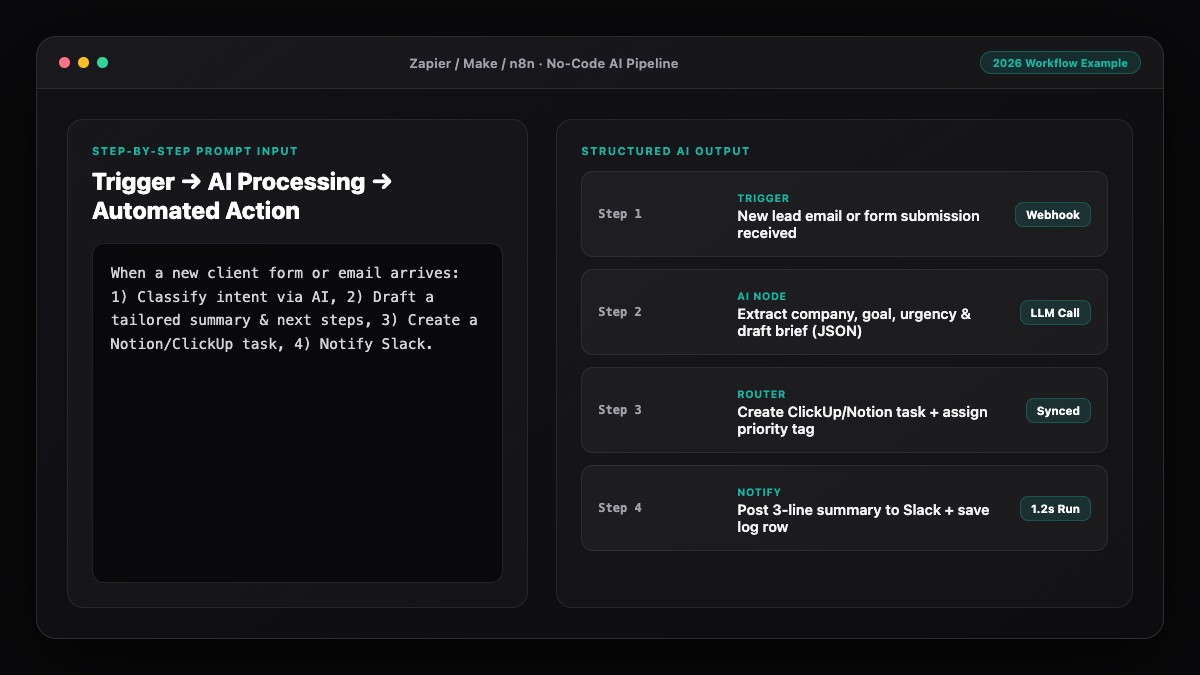
- Workflow A (Sales Intake): Form submission → AI qualifies lead & drafts reply → Saves draft in Gmail + pings Slack.
- Workflow B (Client Onboarding): Invoice paid in Stripe → AI generates tailored kickoff checklist → Creates Notion workspace + Asana tasks.
- Workflow C (Weekly Ops Digest): Every Friday at 4 PM → Pulls completed tasks & open tickets → AI writes executive summary → Posts to leadership channel.
Notice the human checkpoint in Workflow A: the AI drafts the email, but a person clicks send. Keep human approval in place until you have audited at least 30 to 50 consecutive runs with zero errors.
Step 4: Assign Ownership and Document Every Automation
The hidden killer of no-code business automation is "orphan workflows"—systems built by someone who later leaves or forgets how they work. Give every active workflow a simple four-line record in your team wiki:
- Owner: Who is accountable if the output quality drops?
- Trigger & Apps: What starts it and which accounts are connected?
- Failure Plan: Where do error alerts go, and what is the manual fallback?
- Change Log: Dates and reasons whenever a prompt or filter is updated.
Step 5: Measure Hours Saved and Scale Methodically
Track baseline metrics before you launch: how long the task took manually, average response time, and error rate. Review your workflow logs after 30 days.
If a workflow saves five hours a week with minimal manual fixes, lock it in and move to the next bottleneck. If your team spends almost as much time fixing AI drafts as doing the task manually, tighten the prompt context or narrow the workflow's scope. Individuals on your team can also adopt our personal AI automation system guide to reclaim daily focus time.
Best Prompts to Copy and Paste
Use these business-ready prompts in your no-code AI modules to keep outputs accurate and on-brand.
1. Inbound Lead Qualifier & Draft Generator
You are a B2B sales coordinator. Evaluate the lead below against our ideal customer profile (companies with 10+ staff seeking marketing or automation services). Return ONLY valid JSON:
- "fit_score": integer from 1 to 10
- "tier": one of ["High-Fit", "Mid-Fit", "Low-Fit"]
- "reason": 1 sentence explaining the score
- "draft_email": polite 3-sentence reply proposing a 15-minute intro call if tier is High-Fit or Mid-Fit, else empty string

Lead submission:
{{lead_details}}
2. Client Onboarding Kickoff Generator
Create a structured onboarding checklist for a new client based on the purchased package below. Return ONLY valid JSON with key "checklist_items" containing an array of 6 concise task strings (max 12 words each). Base items strictly on the package scope provided.

Package: {{package_name}}
Client notes: {{client_notes}}
3. Weekly Operations Digest
Summarize this week's operational metrics and completed milestones for a leadership update. Use plain, factual language—do not invent numbers or extrapolate trends not shown in the data. Return ONLY valid JSON:
- "top_wins": array of 3 bullet strings
- "bottlenecks": array of up to 2 risks or delays
- "next_week_focus": 1-sentence priority recommendation

Weekly data:
{{weekly_metrics_json}}
Common Mistakes to Avoid
- Automating customer-facing messages without review: Always test on internal drafts before allowing auto-replies to reach paying clients.
- Ignoring compliance and consent rules: Automation does not bypass email opt-in laws or privacy regulations—only process data you have permission to use.
- Building monolith workflows: A 25-step scenario is hard to debug. Break large processes into small, linked workflows.
- Using personal employee accounts for OAuth: Connect company-wide workflows using dedicated service accounts (e.g.,
ops@yourcompany.com) so workflows do not break if someone changes roles. - Skipping spending alerts: Set hard monthly limits on your AI API provider and automation platform to prevent surprise bills from infinite loops.
References & Official Sources
All workflows, pricing tiers, and feature capabilities in this guide were verified against the official platform documentation:
- Zapier Official Automation Platform (zapier.com)
- Make Official Visual Automation (www.make.com)
- n8n Official Workflow Automation (n8n.io)
- OpenAI ChatGPT Official Platform (chatgpt.com)
- Anthropic Claude Official Workspace (claude.ai)
- KwiqRank AI Workflow Integration Guide — Internal methodology for combining AI tools into repeatable business processes.
Final Thoughts
You can automate your business without coding using AI by focusing on clear operational bottlenecks, clean data inputs, and modular human-reviewed workflows. Start with one high-leverage process this week, measure the time saved over 30 days, and build momentum across sales, onboarding, and reporting.
For a deeper look at marketing governance, compliance, and 30-60-90 day rollouts, read our AI marketing workflow integration guide, or contact our team to discuss building reliable AI systems for your business.
Your questions, answered in plain English
Yes. Platforms like Zapier, Make, and n8n let non-technical teams connect CRMs, email, billing, and project trackers with AI models using visual builders and plain-English prompts.
Sales intake and customer operations usually see the fastest payoff—qualifying inbound leads, summarizing discovery calls, routing support tickets, and automating client onboarding checklists.
Use low-temperature JSON prompts, keep human approval steps before external emails or refunds, and start with internal workflows until 30–50 runs pass review cleanly.
Choose Zapier for the fastest setup and broadest app support, Make for lower-cost visual branching at volume, or n8n if you want self-hosted data privacy and custom logic.
Authenticate integrations using a shared company service account rather than personal logins, and document each workflow owner, trigger, and fallback plan in a team wiki.
In practice, it removes repetitive copy-pasting and first-draft busywork so your existing team can spend more time on strategy, client relationships, and complex problem-solving.
Still curious? Send us your question and a strategist will get back to you.

Want this done for you?
We can put this guide to work on your website. Start with a free audit.
Get my free auditWritten by KwiqRank Team
KwiqRank is a digital marketing agency in Mumbai, India, working with UK and US businesses on SEO, GEO, AEO, paid media and websites. We check facts against official sources, and tell you when something is unconfirmed. Spotted a mistake? Tell us and we will correct it.
Found this useful?
Talk to us about your site
Tell us what you are working on and we will say plainly what we would do first.