
How to Create a Daily To-Do List Using AI (Step-by-Step)
Turn messy brain dumps, emails, and meeting notes into a realistic, prioritized daily to-do list using AI in under three minutes.

- Read time
- 7 min read
- Sections
- 11
- FAQs answered
- 6
- Topic
- Everyday Productivity
To create a daily to-do list using AI, dump every half-formed task, email follow-up, and errand into an AI assistant without sorting it first, then prompt it to deduplicate items, convert vague ideas into concrete next actions, estimate durations, and rank the top three priorities. Most traditional to-do lists fail because they become endless graveyards of 25-plus unranked items. AI turns raw mental clutter into a focused, finishable daily checklist in under three minutes.
When every item on your list looks equally urgent, you naturally gravitate toward easy, low-impact chores just to feel productive. By letting AI structure your list using clear action verbs and realistic time budgets, you eliminate morning hesitation and start executing immediately.
What You'll Need
You can run this workflow with a free conversational AI and any simple notes app, or pair it with a dedicated task manager for recurring reminders and mobile capture.
| Tool | Free Tier Capabilities | Paid Tier Capabilities | Best Role for Daily To-Do Lists |
|---|---|---|---|
| ChatGPT | Fast brain-dump cleanup, voice dictation on mobile, checklist formatting | Memory across days, Custom GPTs for your exact list format | Turning spoken or typed brain dumps into clean lists |
| Claude | Sharp categorization, clear action-verb rewrites, clean Markdown output | Projects to store ongoing goals and recurring weekly responsibilities | Breaking vague projects into concrete micro-tasks |
| Gemini | Quick task extraction, easy export to Google Docs or Keep | Pulls action items directly from Gmail threads and Drive docs | Extracting hidden to-dos from long email chains |
| Todoist | Up to 5 projects, natural-language dates, clean Today checklist | Reminders, calendar view, AI Filter Assistant for custom views | Storing and checking off your final daily tasks |
| Notion | Unlimited task databases, checkboxes, custom status properties | Notion AI autofill for task summaries and action-item extraction | Tracking daily tasks alongside project notes |
| Motion | 7-day free trial only | Turns to-do items directly into auto-scheduled calendar blocks | Eliminating manual calendar placement for tasks |
| ClickUp | Unlimited tasks, checklists, priority flags | ClickUp Brain for generating subtasks and summarizing task threads | Managing complex multi-step work deliverables |
Step 1: Do a Zero-Filter Brain Dump
Open ChatGPT or Claude—or use mobile voice dictation while making coffee—and empty your head completely. Do not worry about grammar, order, or categories. Include work deliverables, Slack messages you need to answer, personal errands, and nagging reminders.
If you have unread emails or meeting notes from yesterday, paste the relevant snippets right into the same prompt. Getting everything out of your working memory stops the background anxiety of feeling like you are forgetting something important.
Step 2: Convert Vague Items Into Concrete Next Actions
The number-one reason tasks sit untouched for weeks is ambiguity. "Taxes" or "Website update" is a project, not a task. Instruct the AI to rewrite every vague item so it starts with a strong physical verb and describes a clear finish line.
- Vague: "Client proposal" → AI rewrite: "Draft 2-page pricing table and scope section for Acme proposal (45 min)"
- Vague: "Dentist" → AI rewrite: "Call Dr. Patel's office to book 6-month cleaning (5 min)"
If a task is too big for one sitting, tell the AI to split it into a 20-to-45-minute starter step so you can build momentum without dreading it.
Step 3: Group by Context and Estimate Realistic Times
Switching between deep writing, phone calls, and spreadsheet cleanup drains mental bandwidth. Ask the AI to sort your cleaned-up list into four practical buckets:
- Deep Focus (1–3 items): High-value work requiring uninterrupted concentration.
- Quick Wins (under 10 minutes each): Short messages, approvals, and bookings you can clear in one batch.
- Calls & Collaborations: Anything dependent on another person's schedule.
- Personal / Errands: Home, health, and logistics.
Have the AI attach a realistic minute estimate to every line item and sum the total hours. Seeing that your "quick list" actually totals 11.5 hours gives you an instant reality check before the day begins.
Step 4: Cap Your Must-Dos and Move the Rest to a Parking Lot
A daily to-do list with 18 items is a recipe for end-of-day burnout. Ask the AI to select at most three "Must-Do" items that make today a success, three "Should-Do" items, and push everything else into a "Parking Lot" list. If you want a deeper framework for ranking competing deadlines, read our guide on how to use AI to prioritize your tasks automatically.
Step 5: Sync Into Your Daily Workspace and Time-Block
Copy your final 6-item active list into Todoist, Notion, or a sticky note on your desk. Keep the Parking Lot out of sight so your brain only sees what matters today. Once your list is locked, you can take the next step and use AI to plan your entire day by mapping those items onto your calendar.
Best Prompts to Copy and Paste
Use these copy-paste prompts to turn chaos into a crisp daily checklist.
1. Brain Dump to Prioritized Daily To-Do List
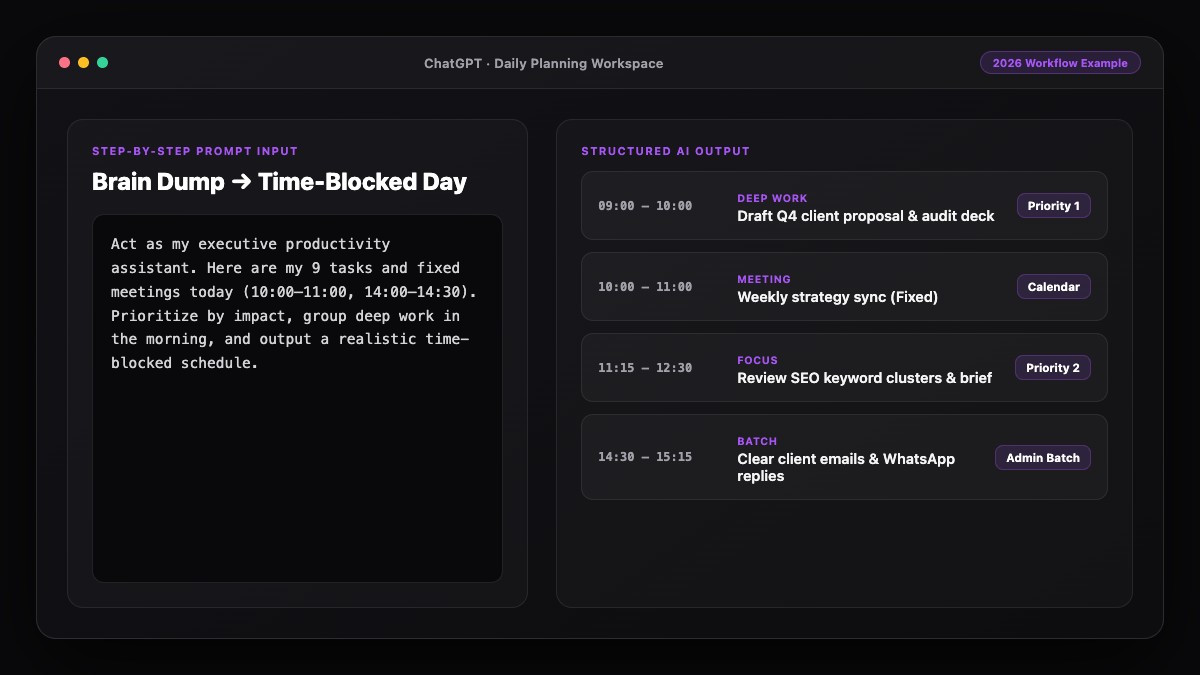
Turn this messy brain dump into a clean, actionable to-do list for today. I have [X] hours of available work time.

Rules:
1. Rewrite every vague item so it starts with an action verb and has a clear finish line.
2. Break any task over 60 minutes into smaller 30-45 minute steps.
3. Estimate realistic minutes for each item and calculate the total time.
4. Organize the output into:
   - Top 3 Must-Dos (non-negotiable high-impact work)
   - Quick Wins Batch (all tasks under 10 minutes)
   - Secondary Tasks (only if Must-Dos finish early)
   - Parking Lot (everything that exceeds my [X] hours)

Brain dump:
[PASTE YOUR RAW LIST HERE]
2. Email & Meeting Notes to Actionable To-Dos
Read the following notes/emails and extract every action item I personally owe. Ignore FYI updates. Format each item as: [Action Verb + Deliverable] — [Estimated Minutes] — [Deadline if mentioned].

Notes:
[PASTE TEXT HERE]
Common Mistakes to Avoid
- Letting AI keep every single task on today's list: If you do not enforce a strict cap of 3 Must-Dos, the AI will happily output a 20-item checklist that overwhelms you by 10:00 AM.
- Forgetting to include personal errands: Leaving groceries, pharmacy pickups, or school forms off your main list creates hidden mental friction. Put everything in one brain dump.
- Trusting AI's first time estimate blindly: AI often underestimates creative or technical tasks. Tell it "add a 25% time buffer to my estimates" until it learns your pace.
- Keeping the Parking Lot visible all day: Archive or collapse deferred tasks so you stay focused on finishing the top three.
References & Official Sources
All workflows, pricing tiers, and feature capabilities in this guide were verified against the official platform documentation:
- OpenAI ChatGPT Official Platform (chatgpt.com)
- Anthropic Claude Official Workspace (claude.ai)
- Google Gemini Official Assistant (gemini.google.com)
- Notion AI Official Documentation (www.notion.so)
- Todoist Official Task Manager (todoist.com)
- KwiqRank AI Workflow Integration Guide — Internal methodology for combining AI tools into repeatable business processes.
Final Thoughts
When you create a daily to-do list using AI, you stop spending your sharpest morning willpower on deciding what to do and start spending it on doing the work. Keep your brain dump effortless, demand concrete action verbs, and cap your Must-Dos at three. Once your daily checklist habit sticks, learn how to manage multiple tasks with AI without getting overwhelmed or explore our AI marketing workflow integration guide for team-level workflows.
Your questions, answered in plain English
ChatGPT and Claude are the fastest for turning raw brain dumps into structured lists, while Todoist and Notion are ideal for storing and checking off those tasks throughout the day.
Keep your active list to 3 Must-Do tasks and 3 Secondary tasks, plus one small batch of 5-to-10-minute quick wins. Anything beyond that should move to a Parking Lot.
Yes. You can paste meeting transcripts or email threads into ChatGPT or Claude, or use Gemini inside Gmail to pull out every action item you owe.
Tell the AI to add a 25% buffer to all estimates and specify your experience level with the task, such as "I am slow at spreadsheet formatting."
Voice dictation in the ChatGPT mobile app is often faster because you can speak uninterrupted for 90 seconds and let the AI clean up the transcript into a checklist.
A to-do list defines what needs to get done and in what priority order, while a daily schedule assigns each item to a specific time block on your calendar.
Still curious? Send us your question and a strategist will get back to you.

Want this done for you?
We can put this guide to work on your website. Start with a free audit.
Get my free auditWritten by KwiqRank Team
KwiqRank is a digital marketing agency in Mumbai, India, working with UK and US businesses on SEO, GEO, AEO, paid media and websites. We check facts against official sources, and tell you when something is unconfirmed. Spotted a mistake? Tell us and we will correct it.
Found this useful?
Talk to us about your site
Tell us what you are working on and we will say plainly what we would do first.