
How to Use AI to Prioritize Your Tasks Automatically
Stop treating every task as urgent. Learn how to use AI task prioritization with Eisenhower Matrix and Impact/Effort prompts to rank your day in seconds.

- Read time
- 6 min read
- Sections
- 11
- FAQs answered
- 6
- Topic
- Everyday Productivity
To use AI task prioritization effectively, feed your AI assistant your full list of open tasks along with three scoring criteria—deadline urgency, business or personal impact, and required mental energy—and ask it to rank every item using a structured framework like the Eisenhower Matrix or ICE scoring. Human brains are notoriously bad at prioritizing under stress because we mistake loud, urgent pings for important work. AI evaluates your list objectively in seconds, separating true needle-movers from busywork.
When everything feels like a "Priority 1," nothing actually gets finished on time. By turning prioritization into a repeatable 3-minute AI check-in, you protect your best hours for high-leverage work and stop ending the day exhausted with your biggest goal untouched.
What You'll Need
You can run AI prioritization inside a free chat window or use a task manager with built-in priority automation.
| Tool | Free Tier Capabilities | Paid Tier Capabilities | Best Role in Task Prioritization |
|---|---|---|---|
| ChatGPT | Instant Eisenhower Matrix sorting, RICE/ICE scoring tables | Custom GPTs tuned to your exact quarterly goals and weights | Fast daily and weekly priority scoring |
| Claude | Nuanced trade-off reasoning, clear "Why this ranks #1" explanations | Projects holding your strategic goals and client SLA rules | Complex multi-project trade-off decisions |
| Gemini | Quick ranking lists, table exports to Google Sheets | Scans Gmail urgency and Calendar deadlines for priority context | Prioritizing inbox-driven workloads |
| Motion | 7-day trial only | Calculates dynamic priority scores and auto-places tasks on calendar | Hands-free continuous reprioritization |
| Todoist | P1–P4 priority flags, custom filters by deadline | AI Filter Assistant to build custom priority views from plain English | Daily execution of ranked P1/P2/P3 tasks |
| Notion | Database formulas for Impact/Effort scoring | Notion AI autofill to score and summarize priority backlogs | Managing large project backlogs and roadmaps |
| ClickUp | 4 priority levels, custom sort views | ClickUp Brain to flag overdue blockers and rank sprint tasks | Team sprint and cross-functional prioritization |
Step 1: Give AI Your Decision Criteria First
AI cannot tell you what is important if you never define what "winning" looks like this week. Before pasting your tasks, state your top one or two overarching goals—for example: "Close the Q4 enterprise renewal and publish two client case studies."
Also share any non-negotiable constraints, such as hard client deadlines, dependencies (tasks blocking other teammates), and how many focused hours you actually have today.
Step 2: Paste Your Unfiltered Backlog and Pick a Framework
Dump your entire task list into Claude or ChatGPT and tell it which prioritization lens to apply:
- Eisenhower Matrix (Best for daily overwhelm): Splits tasks into Do Now (Urgent + Important), Schedule (Important, Not Urgent), Delegate, and Drop.
- Impact vs. Effort (Best for weekly planning): Highlights quick high-ROI wins and flags low-impact time sinks.
- Eat the Frog + Leverage (Best for solo creators/founders): Surfaces the single task that makes every other task easier or unnecessary.
If you are starting from a completely chaotic morning list, first see how to create a daily to-do list using AI so every item has a clear verb and time estimate.
Step 3: Force AI to Cut at Least 30 Percent of Your List
The hardest part of prioritization is deciding what not to do. Instruct the AI to act like a ruthless editor: if you have 15 tasks, require it to mark at least 5 as "Defer, Delegate, or Delete" and justify why.
Reading an objective explanation—such as "Updating your portfolio font has zero impact on this week's revenue goal; defer to Friday"—breaks emotional attachment to comfortable busywork.
Step 4: Match Ranked Tasks to Your Calendar and Energy
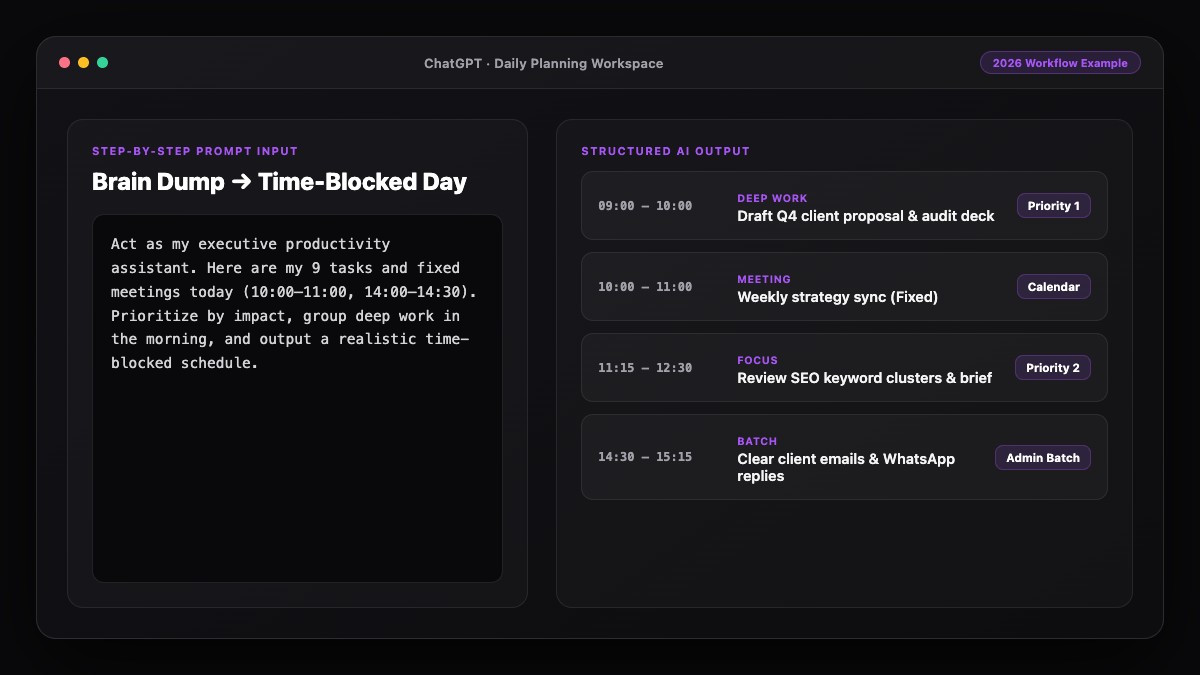
A ranked list still fails if you put your #1 hardest task at 4:30 PM when your brain is fried. Once AI outputs your Top 3 priorities, map them directly onto your peak focus window. You can automate this placement with Motion or follow our step-by-step guide to use AI to plan your entire day.
Step 5: Re-Rank Automatically When New Requests Arrive
Urgent Slack messages and "quick favors" ruin priorities mid-day. Whenever a new request lands, do not automatically drop what you are doing. Paste it into your priority thread and ask: "Does this outrank my current #1 or #2? If yes, what gets pushed to tomorrow?" This forces a conscious trade-off instead of reactive multitasking. For handling heavy multi-project days, check our guide on how to manage multiple tasks with AI without getting overwhelmed.
Best Prompts to Copy and Paste
Copy these prioritization prompts whenever your backlog starts to feel heavy.
1. The Ruthless Eisenhower + Impact Ranker
Act as a ruthless chief of staff. Rank my task list below based on my #1 goal this week: [INSERT GOAL].
I only have [X] hours of real work capacity today.

Instructions:
1. Score each task from 1-10 on Impact toward my goal and 1-10 on Urgency (real external deadline).
2. Sort them into:
   - DO FIRST (Top 3 highest-leverage items)
   - SCHEDULE LATER (Important, no deadline today)
   - DELEGATE OR BATCH (Low-skill admin)
   - DROP / DEFER (At least 30% of the list must go here)
3. Briefly explain why the #1 task beats everything else.

My tasks:
[PASTE TASK LIST]
2. Mid-Day Interrupt Trade-Off Prompt
A new urgent request just arrived: "[DESCRIBE REQUEST, estimated time: X min]".
My current top 3 priorities today are:
1. [Task 1]
2. [Task 2]
3. [Task 3]
Based on deadline and impact, should I do this now, schedule it for tomorrow, or push back? Tell me exactly what gets displaced if I say yes.
Common Mistakes to Avoid
- Omitting deadlines and effort estimates: Without knowing whether a task takes 10 minutes or 4 hours, AI cannot calculate true ROI.
- Labeling every task "urgent": Distinguish between real external deadlines (a client presentation at 2 PM) and self-imposed urgency (clearing your inbox to zero).
- Never challenging AI's ranking: You hold context AI cannot see, like office politics or a teammate's mood. Use AI's ranking as an 80% draft and adjust the final 20% yourself.
- Over-scoring every project in Notion: Keep scoring simple—Urgency, Impact, and Minutes—so you actually use it every morning.
References & Official Sources
All workflows, pricing tiers, and feature capabilities in this guide were verified against the official platform documentation:
- OpenAI ChatGPT Official Platform (chatgpt.com)
- Anthropic Claude Official Workspace (claude.ai)
- Google Gemini Official Assistant (gemini.google.com)
- Notion AI Official Documentation (www.notion.so)
- Todoist Official Task Manager (todoist.com)
- KwiqRank AI Workflow Integration Guide — Internal methodology for combining AI tools into repeatable business processes.
Final Thoughts
AI task prioritization replaces emotional decision-making with clear, goal-driven trade-offs. When you know exactly what deserves your first two hours—and why—you get more meaningful work done in less time. Once your priorities are locked, build a complete weekly plan using AI or explore our AI marketing workflow integration guide to align priorities across your entire team.
Your questions, answered in plain English
You give an AI model your open tasks, deadlines, time estimates, and main goals, and it scores and sorts each item using frameworks like the Eisenhower Matrix or Impact vs. Effort.
ChatGPT and Claude are best for fast daily ranking via prompts, while Motion automatically calculates priority and places tasks directly onto your calendar.
The Eisenhower Matrix works best for daily triage because it separates true urgency from busywork, while Impact vs. Effort is ideal for weekly project planning.
Explicitly instruct the AI to pick at most three "Do First" tasks and force it to defer or drop at least 30% of the list.
Yes. Paste the new request into your existing priority chat and ask whether it outranks your current top three items and what must be displaced.
No. Free versions of ChatGPT, Claude, and Todoist are more than enough to rank your daily tasks in under three minutes.
Still curious? Send us your question and a strategist will get back to you.

Want this done for you?
We can put this guide to work on your website. Start with a free audit.
Get my free auditWritten by KwiqRank Team
KwiqRank is a digital marketing agency in Mumbai, India, working with UK and US businesses on SEO, GEO, AEO, paid media and websites. We check facts against official sources, and tell you when something is unconfirmed. Spotted a mistake? Tell us and we will correct it.
Found this useful?
Talk to us about your site
Tell us what you are working on and we will say plainly what we would do first.