
How to Plan Your Week Using AI in 15 Minutes
A fast, repeatable 5-step weekly reset to plan your week using AI tools like ChatGPT, Gemini, Motion, and Reclaim.ai in just 15 minutes.

- Read time
- 7 min read
- Sections
- 11
- FAQs answered
- 6
- Topic
- Time Management
To plan your week using AI in 15 minutes, run a structured 5-step weekly reset every Friday afternoon or Sunday evening: dump your unfinished tasks and upcoming meetings into ChatGPT or Gemini, select your top 3 weekly outcomes, assign realistic time estimates, and push those priorities into Google Calendar, Motion, or Reclaim.ai. Instead of spending Sunday night dreading Monday morning, you start the week with a realistic, conflict-free roadmap.
Most people enter Monday morning reactively—opening their inbox, reacting to whoever shouted loudest, and wondering by Thursday why none of their strategic goals moved forward. Learning how to plan your week using AI compresses an hour of scattered Sunday planning into a repeatable 15-minute ritual. AI handles the heavy lifting: spotting calendar overload, grouping similar tasks into batches, and flagging impossible deadlines before the week even begins.
What You'll Need
You can run a 15-minute AI weekly plan using a conversational assistant like ChatGPT or Gemini, or let a calendar automation tool like Motion or Reclaim.ai place the blocks for you.
| Tool | Free Tier | Paid Tier | Weekly Planning Role |
|---|---|---|---|
| ChatGPT | Free tier with daily limits | ChatGPT Plus at $20/month | Turns brain dumps, carryover tasks, and calendar lists into a prioritized Monday–Friday plan |
| Google Calendar + Gemini | Free Google Calendar; basic Gemini | Google Workspace Business / AI Premium (~$20/month) | Reads upcoming Google Calendar events and drafts weekly focus summaries in Workspace |
| Reclaim.ai | Free Lite plan (basic habits & tasks) | Starter from ~$8–$10/user/month | Locks weekly Focus Time targets and Smart Habits before meetings fill the week |
| Motion | 7-day free trial | Starts around $19–$34/month | Auto-slots your entire weekly task backlog across Monday–Friday with deadline warnings |
Step 1: Brain Dump and Capture Everything (3 Minutes)
Set a 15-minute timer. For the first 3 minutes, empty your head without organizing anything. Gather four inputs:
- Carryover tasks: Unfinished items from this week that still matter.
- Inbox & Slack commitments: Promises you made in emails or DMs over the last 5 days.
- Next week's fixed meetings: Copy your Monday–Friday calendar list from Google Calendar or Outlook.
- Personal constraints: Doctor appointments, travel, workouts, or early family pickups.
If you already use an automated task-syncing setup, check out our guide on how to use AI to schedule tasks automatically around meetings.
Step 2: Triage and Pick Your Top 3 Weekly Outcomes (3 Minutes)
A common trap in weekly planning is treating 25 tasks as equally important. Paste your raw brain dump into ChatGPT or Gemini and instruct it to group tasks by theme and surface the Big 3—the three deliverables that, if completed by Friday, will make the week a clear win.
Ask the AI to explicitly move "nice-to-have" items to a Next Week / Backlog list so they do not clutter your Monday–Friday execution.
Step 3: Calculate Real Capacity vs. Meeting Load (3 Minutes)
This is where AI saves you from chronic overcommitting. Have ChatGPT or Reclaim.ai subtract your fixed meeting hours, lunch breaks, and 20% daily buffer from your 40-hour week.
- If you have 18 hours of meetings, you do not have 22 hours of deep work—you have roughly 12 to 14 hours of usable focus capacity after buffers and admin.
- Compare your task time estimates against those 12–14 hours. If your task list totals 20 hours, cut or delegate 6 hours right now rather than carrying guilt all week.
For tips on keeping meetings from eating your remaining hours, see our guide on how to protect focus time using AI.
Step 4: Assign Days and Batch Similar Work (4 Minutes)
Context switching drains up to 25% of your productive energy. Ask AI to theme your days or half-days based on your existing meeting clusters:
- Deep-work mornings (Mon/Wed/Fri): Reserve 8:30 AM–12:00 PM for your Big 3 strategic deliverables.
- Meeting-heavy blocks (Tue/Thu): Cluster 1:1s, client calls, and team syncs together so you preserve long uninterrupted stretches elsewhere.
- Admin batch (Friday afternoon): Group invoicing, expense reports, inbox zero, and next week's 15-minute reset into one 90-minute block.
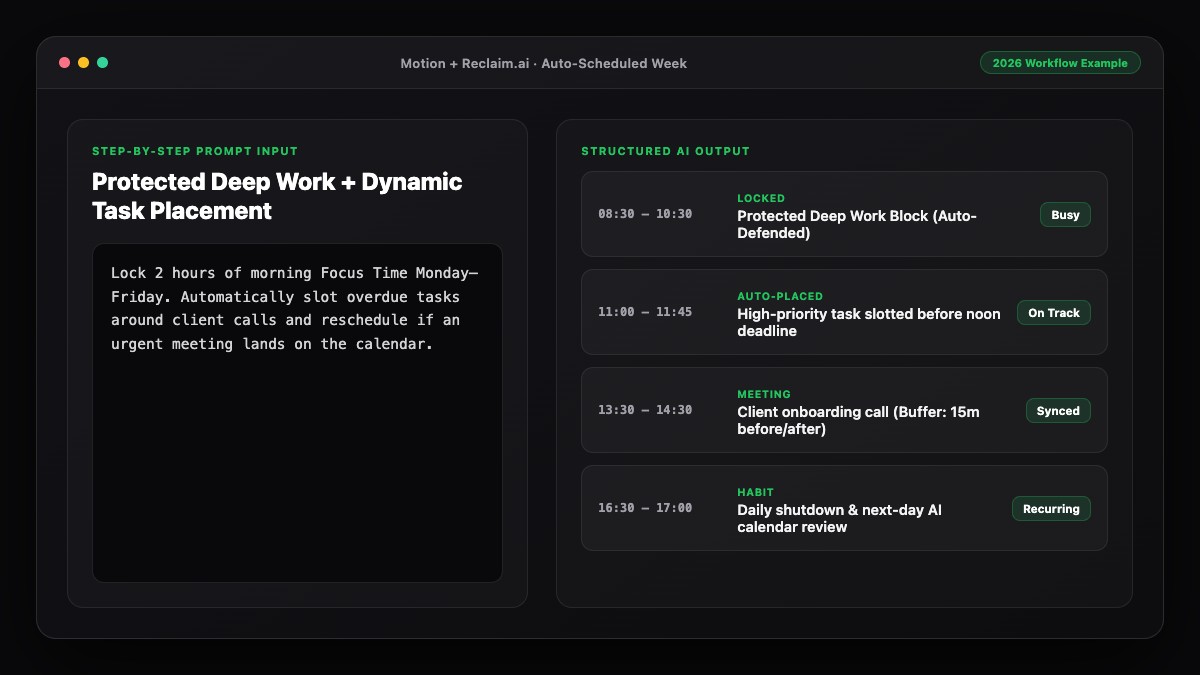
If you use Motion or Reclaim.ai, simply enter your tasks with deadlines and let the engine place them automatically; learn more in how to use AI to automatically plan your calendar.
Step 5: Lock Your Calendar and Set Daily Checkpoints (2 Minutes)
In the final 2 minutes, transfer your AI-generated plan onto your live calendar. Create concrete time blocks for your Big 3 outcomes—never leave them as vague floating to-dos. Set a recurring 5-minute morning check-in on your calendar each day to verify whether yesterday's plan still holds or needs a quick AI rebalance.
Best Prompts to Copy and Paste
Save these two prompts in a pinned note so your 15-minute weekly reset runs on autopilot every Friday or Sunday.
Prompt 1: The 15-Minute AI Weekly Reset
Act as my executive productivity coach. Help me plan my upcoming workweek (Monday–Friday, 8:30 AM to 5:30 PM) in 15 minutes.

Here are my fixed meetings for next week:
[Paste your Monday–Friday meetings with times]

Here is my raw brain dump of tasks and deadlines:
[Paste your tasks, projects, and rough time estimates]

Please:
1. Calculate my true available deep-work hours after subtracting meetings, a 45-minute daily lunch, and a 15% daily buffer.
2. Recommend my "Big 3" weekly outcomes and flag any tasks that should be deferred or delegated because they exceed capacity.
3. Group similar tasks into themed batches and output a clean Monday–Friday schedule table.
Prompt 2: Mid-Week Course Correction (Wednesday Check-In)
It is Wednesday morning and my week has shifted. Here is what I actually finished on Monday and Tuesday:
[List completed items]

Here is what slipped, plus new urgent requests:
[List remaining + new tasks]

Here are my fixed meetings for Wednesday–Friday:
[Paste remaining meetings]

Re-balance my Wednesday–Friday schedule so I still hit my most important Friday deadlines without working past 5:30 PM.
Common Mistakes to Avoid
- Planning on Monday at 9:00 AM: By 9:05 AM, Slack messages and urgent emails will hijack your planning window. Always run your 15-minute reset on Friday afternoon or Sunday evening.
- Ignoring buffer time: Scheduling 40 hours of meetings plus tasks guarantees your plan will fail by Tuesday afternoon.
- Skipping time estimates: Without rough durations (30, 60, 90 minutes), neither you nor AI can tell whether a week is realistic.
- Treating the weekly plan as set in stone: A weekly plan is a living compass. Pair it with a smart daily system—see how to create a smart productivity schedule using AI.
References & Official Sources
All workflows, pricing tiers, and feature capabilities in this guide were verified against the official platform documentation:
- Motion AI Calendar & Task Scheduler (www.usemotion.com)
- Reclaim.ai Smart Calendar Defense (reclaim.ai)
- Google Workspace Calendar & AI (workspace.google.com)
- OpenAI ChatGPT Official Platform (chatgpt.com)
- Google Gemini Official Assistant (gemini.google.com)
- KwiqRank AI Workflow Integration Guide — Internal methodology for combining AI tools into repeatable business processes.
Final Thoughts
Once you know how to plan your week using AI in 15 minutes, you trade reactive firefighting for calm, intentional execution. One brief weekly reset gives you clarity on your Big 3 priorities, protects your deep work, and exposes overcommitment before Monday morning arrives. To zoom in on day-to-day execution, read our guide on how to use AI to plan your entire day, or contact our team to build custom AI workflows for your organization.
Your questions, answered in plain English
Friday afternoon (around 3:30 PM) or Sunday evening works best. Planning on Friday lets you close open loops while context is fresh, so you can unplug completely over the weekend.
Yes. The free tiers of ChatGPT or Google Gemini combined with Google Calendar and Google Tasks are more than enough to run a 15-minute weekly brain dump, capacity check, and schedule.
When you paste your fixed meetings and task time estimates into ChatGPT (or sync them in Motion/Reclaim.ai), the AI compares total required hours against your remaining open blocks and flags overloads immediately.
Include your workday start/end times, all fixed meetings, your carryover and new tasks with rough duration estimates, and any personal appointments.
No. Leave 15% to 20% of your week unscheduled as buffer capacity so unexpected client requests or overrun tasks do not derail your entire week.
Run a 2-minute mid-week rebalance on Wednesday morning—either automatically via Motion/Reclaim.ai or by pasting your updated list into ChatGPT.
Still curious? Send us your question and a strategist will get back to you.

Want this done for you?
We can put this guide to work on your website. Start with a free audit.
Get my free auditWritten by KwiqRank Team
KwiqRank is a digital marketing agency in Mumbai, India, working with UK and US businesses on SEO, GEO, AEO, paid media and websites. We check facts against official sources, and tell you when something is unconfirmed. Spotted a mistake? Tell us and we will correct it.
Found this useful?
Get recommended by AI search
We check whether Google, ChatGPT and Perplexity can reach your pages, then fix what blocks them. No guarantees, just a clear plan.