
How to Protect Your Focus Time Using AI Scheduling Tools
Learn how to defend deep work hours with Reclaim.ai, Motion, Google Calendar, and ChatGPT using dynamic Free-to-Busy rules and meeting audits.

- Read time
- 7 min read
- Sections
- 11
- FAQs answered
- 6
- Topic
- Time Management
To protect focus time using AI, connect your calendar to an intelligent time-blocking tool like Reclaim.ai or Motion, set a weekly deep-work target, and configure dynamic "Free/Busy" rules that automatically lock focus blocks before meetings consume your day. Instead of manually drawing static "Do Not Disturb" blocks that coworkers ignore or that leave you rigid, AI defends your uninterrupted work hours dynamically while still leaving flexible slots for genuine collaboration.
Most knowledge workers suffer from "calendar Swiss cheese"—a day chopped into awkward 30-minute gaps between Slack huddles and status calls. Research consistently shows it takes over 20 minutes to regain deep concentration after a single interruption. Learning how to protect focus time using AI stops meeting creep before it starts: the AI monitors your remaining weekly capacity and automatically flips open focus blocks from "Free" to "Busy" the moment your schedule gets tight.
What You'll Need
You can defend deep work using specialized calendar-defense apps or by pairing your existing calendar with AI assistants. Here is how the top options compare across free and paid tiers.
| Tool | Free Tier | Paid Tier | Focus Protection Capability |
|---|---|---|---|
| Reclaim.ai | Free Lite plan (1–3 habits, basic focus tracking) | Starter from ~$8–$10/user/month | Best-in-class dynamic Focus Time defense with automatic Free-to-Busy flipping |
| Motion | 7-day free trial | Starts around $19–$34/month | Schedules concrete tasks as busy blocks so meetings cannot overwrite deliverable time |
| ChatGPT | Free tier with daily usage limits | ChatGPT Plus at $20/month | Audits weekly calendar exports to spot meeting bloat and draft decline/async scripts |
| Google Calendar + Gemini | Free Google Calendar "Focus Time" event type; basic Gemini | Google Workspace Business / AI Premium (~$20/month) | Native "Do Not Disturb" auto-decline during Focus Time plus Gemini schedule audits |
Step 1: Define Your Weekly Focus Time Quota
Before configuring any tool, decide how many hours of uninterrupted deep work you actually need each week. Trying to block 30 hours of focus time in a 40-hour meeting-heavy role will only cause constant conflicts.
- Individual contributors (engineers, writers, designers): Aim for 15 to 20 hours of protected focus time per week (3–4 hours daily).
- Managers and team leads: Aim for 8 to 12 hours per week, ideally grouped into two 2-hour morning blocks and one 4-hour "No-Meeting" afternoon.
- Set minimum block length: Configure your AI tool to never split focus time into chunks smaller than 60 or 90 minutes, since 30-minute slivers are useless for deep work.
Step 2: Enable Dynamic Free-to-Busy Defense
Static calendar blocks fail because teammates stop respecting them once they see you are "always busy." Dynamic AI defense solves this by staying flexible until scarcity hits.
- In Reclaim.ai, open the Focus Time settings and set your weekly target (e.g., 15 hours).
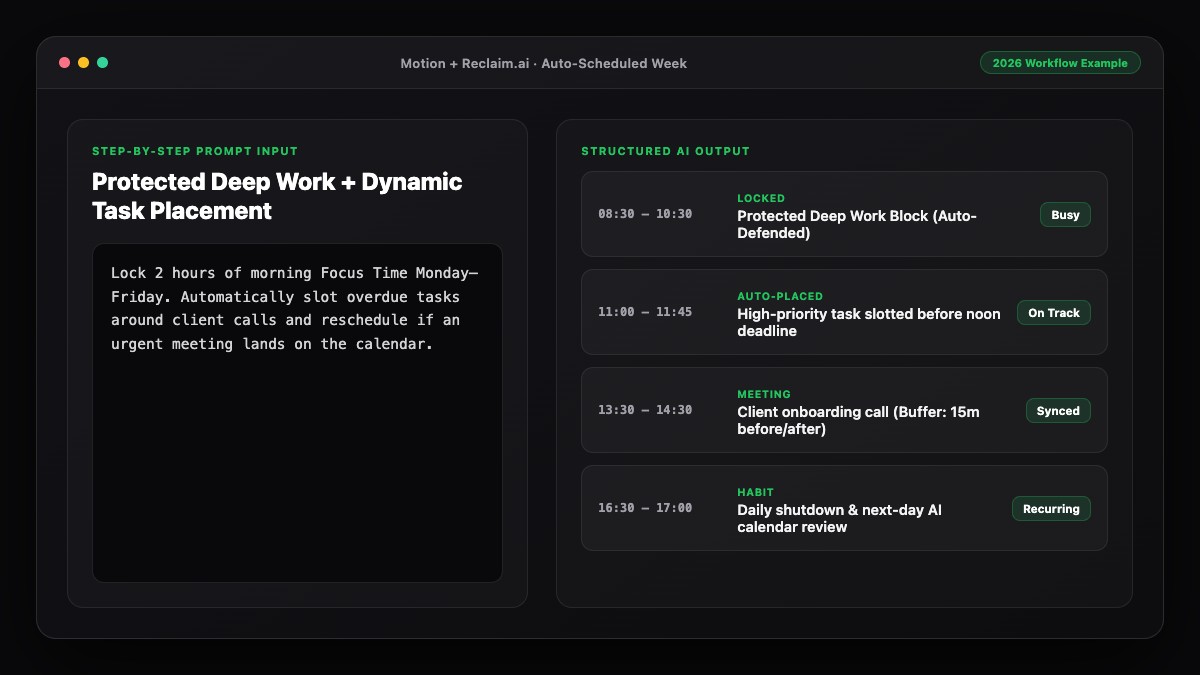
- Set the defense mode to Balanced or Proactive: the AI places focus blocks on your calendar marked as Free (so urgent meetings can still land if needed), and automatically switches them to Busy when your remaining focus hours drop near your minimum threshold.
- Choose your preferred time of day (for example, 8:30 AM–12:00 PM) so the AI prioritizes morning deep work first and only falls back to afternoons when mornings are booked.
If you also want concrete deliverables placed inside those blocks, check out our guide on how to use AI to schedule tasks automatically around meetings.
Step 3: Pair Focus Blocks with Auto-Decline and Buffers
A protected calendar block does not help if Slack notifications and back-to-back Zoom calls still break your flow.
- Google Calendar native auto-decline: If you use Google Workspace, use the native "Focus Time" event type and check Automatically decline meetings (new invites only, or all conflicting invites).
- Slack status sync: Connect Reclaim.ai to Slack so your status automatically switches to "In Focus Time" and pauses notifications whenever a defended block starts.
- Decompression buffers: Turn on automatic 15-minute buffers after external meetings so you have time to capture action items before diving back into deep work.
Step 4: Audit and Consolidate Fragmented Meetings
AI cannot protect focus time if your week is already 80% full of recurring status calls. Use ChatGPT or Gemini once a month to run a ruthless meeting audit.
Export or copy your recurring weekly meetings into ChatGPT and ask it to identify which meetings can be batched onto a single "Meeting Day" (like Tuesdays and Thursdays) or converted into a 5-minute async Loom or Slack update. For a full workflow on balancing both sides of your calendar, see how to use AI to manage meetings and tasks together.
Step 5: Protect Energy, Not Just Hours
Two hours of focus time at 9:00 AM is worth four hours of focus time at 4:00 PM. Review your AI focus analytics at the end of each week—both Reclaim.ai and Motion show how many focus hours were defended versus interrupted. If your mornings are still getting hijacked, tighten your scheduling link availability so external guests can only book between 1:00 PM and 4:30 PM.
Best Prompts to Copy and Paste
Use these prompts in ChatGPT or Gemini to reclaim fragmented time and push back on unnecessary meetings professionally.
Prompt 1: Weekly Calendar Audit to Reclaim Focus Blocks
I want to protect at least 12 hours of deep focus time per week (minimum 90-minute blocks). Here is my current list of recurring weekly meetings:
[Paste your Monday–Friday recurring meetings with times and attendees]

Analyze this schedule and tell me:
1. Where my calendar is most fragmented into unusable 30-minute gaps.
2. Which 3–4 meetings I should propose moving to create two uninterrupted 3-hour morning focus blocks.
3. Which recurring meetings look like candidates for async updates instead of live calls.
Prompt 2: Polite Meeting Decline / Async Alternative Script
Write a polite, concise Slack or email reply declining a 30-minute recurring status meeting that lands in the middle of my morning deep-work block. Offer two alternatives:
1. Moving it to Tuesday or Thursday afternoon between 2:00 PM and 4:00 PM.
2. Sharing a structured 3-bullet async update in Slack every Monday morning instead.

Keep the tone collaborative, appreciative, and under 80 words.
Common Mistakes to Avoid
- Marking every focus block "Busy" from day one: If teammates see zero availability all week, they will start overriding your calendar or messaging you directly. Let AI keep early blocks flexible until your quota is at risk.
- Allowing 30-minute focus blocks: Half an hour is barely enough time to open your files and remember where you left off. Enforce a 60- or 90-minute minimum.
- Forgetting booking links: Tools like Calendly or Google Appointment Schedules will happily book over "Free" focus holds unless you sync your AI focus rules with your booking availability hours.
- Skipping the weekly reset: Take 15 minutes every Friday to check next week's defended blocks using our guide on how to plan your week using AI in 15 minutes.
References & Official Sources
All workflows, pricing tiers, and feature capabilities in this guide were verified against the official platform documentation:
- Motion AI Calendar & Task Scheduler (www.usemotion.com)
- Reclaim.ai Smart Calendar Defense (reclaim.ai)
- Google Workspace Calendar & AI (workspace.google.com)
- OpenAI ChatGPT Official Platform (chatgpt.com)
- Google Gemini Official Assistant (gemini.google.com)
- KwiqRank AI Workflow Integration Guide — Internal methodology for combining AI tools into repeatable business processes.
Final Thoughts
When you protect focus time using AI, you stop relying on willpower to say no to every calendar invite. Dynamic Free-to-Busy rules, morning-first scheduling, and automated Slack status syncing guard your best thinking hours automatically. To tie your defended focus blocks into a full daily routine, read our guide on how to use AI to plan your entire day, or reach out to our team for help streamlining your team's AI productivity stack.
Your questions, answered in plain English
Reclaim.ai is purpose-built for defending focus time because its dynamic Free-to-Busy engine keeps your calendar flexible for teammates while guaranteeing you hit your weekly deep-work target.
Individual contributors should aim for 15 to 20 hours per week, while managers and team leads typically aim for 8 to 12 hours grouped into 90-minute or 2-hour blocks.
Static blocks stay fixed on your calendar and either get ignored by coworkers or leave your schedule inflexible. AI focus defense automatically moves focus blocks around high-priority meetings and locks them as Busy only when capacity runs low.
Yes, Google Workspace includes a built-in Focus Time event type that can auto-decline conflicting invites, though it does not dynamically reschedule itself when a higher-priority meeting arrives like Reclaim.ai does.
Set your AI tool to Proactive defense, limit external scheduling links to afternoon hours, and enable auto-decline on protected deep-work blocks.
Yes. Pairing defended focus hours with concrete deliverables—using Motion or Reclaim.ai task syncing—prevents you from spending deep-work time deciding what to work on.
Still curious? Send us your question and a strategist will get back to you.

Want this done for you?
We can put this guide to work on your website. Start with a free audit.
Get my free auditWritten by KwiqRank Team
KwiqRank is a digital marketing agency in Mumbai, India, working with UK and US businesses on SEO, GEO, AEO, paid media and websites. We check facts against official sources, and tell you when something is unconfirmed. Spotted a mistake? Tell us and we will correct it.
Found this useful?
Talk to us about your site
Tell us what you are working on and we will say plainly what we would do first.