
How to Use AI to Manage Meetings and Tasks Together
Learn how to unify meetings and tasks on one AI-powered calendar using Motion, Reclaim.ai, Google Calendar, Gemini, and ChatGPT.

- Read time
- 7 min read
- Sections
- 11
- FAQs answered
- 6
- Topic
- Time Management
To manage meetings and tasks with AI together, unify both commitments onto a single dynamic timeline using an AI calendar platform like Motion or Reclaim.ai, or pair Google Calendar with Gemini and ChatGPT. When meetings and tasks live in one system, AI automatically protects time for deliverables, adds post-call action buffers, and reschedules tasks whenever a meeting moves—eliminating double-booking and missed deadlines.
The biggest productivity leak for modern teams is keeping meetings in one app (Google Calendar or Outlook) and tasks in another (Asana, Notion, Todoist, or Slack). Because your calendar shows empty white space while your to-do list is overflowing, you keep saying "yes" to meetings until there are zero hours left to actually do the work those meetings created. Learning how to manage meetings and tasks with AI bridges that gap by treating every task as a real calendar commitment.
What You'll Need
Choose a tool stack that connects your calendar events directly with your task backlog, or use an AI assistant to coordinate both.
| Tool | Free Tier | Paid Tier | Meeting + Task Integration |
|---|---|---|---|
| Reclaim.ai | Free Lite plan (basic habits, tasks, Smart 1:1s) | Starter from ~$8–$10/user/month | Syncs tasks from Asana/Todoist/Jira/Linear and auto-schedules Smart 1:1s around deep work |
| Motion | 7-day free trial | Starts around $19–$34/month | Combines calendar, AI task scheduler, and booking links in one unified workspace |
| Google Calendar + Gemini | Free Calendar & Tasks; basic Gemini | Google Workspace Business / AI Premium (~$20/month) | Turns Gmail/Meet action items into Google Tasks and checks schedule conflicts natively |
| ChatGPT | Free tier with daily usage limits | ChatGPT Plus at $20/month | Extracts tasks from meeting transcripts and builds unified daily execution plans |
Step 1: Connect Your Calendar and Task Manager into One View
Stop flipping between two tabs to figure out if you have time for a project. Connect your task list directly to your calendar:
- If you use Asana, Todoist, Linear, Jira, or ClickUp: Connect it to Reclaim.ai. Every assigned task with a due date is automatically scheduled onto your Google Calendar as a flexible time block.
- If you want one unified app: Use Motion, where your meetings, tasks, and booking links share the exact same calendar grid.
Need help setting up the task-syncing rules? Follow our step-by-step tutorial on how to use AI to schedule tasks automatically around meetings.
Step 2: Automate Smart 1:1s and Booking Links
Recurring 1:1s and external booking links are notorious for shattering deep-work mornings. Instead of locking a Tuesday 10:00 AM slot forever:
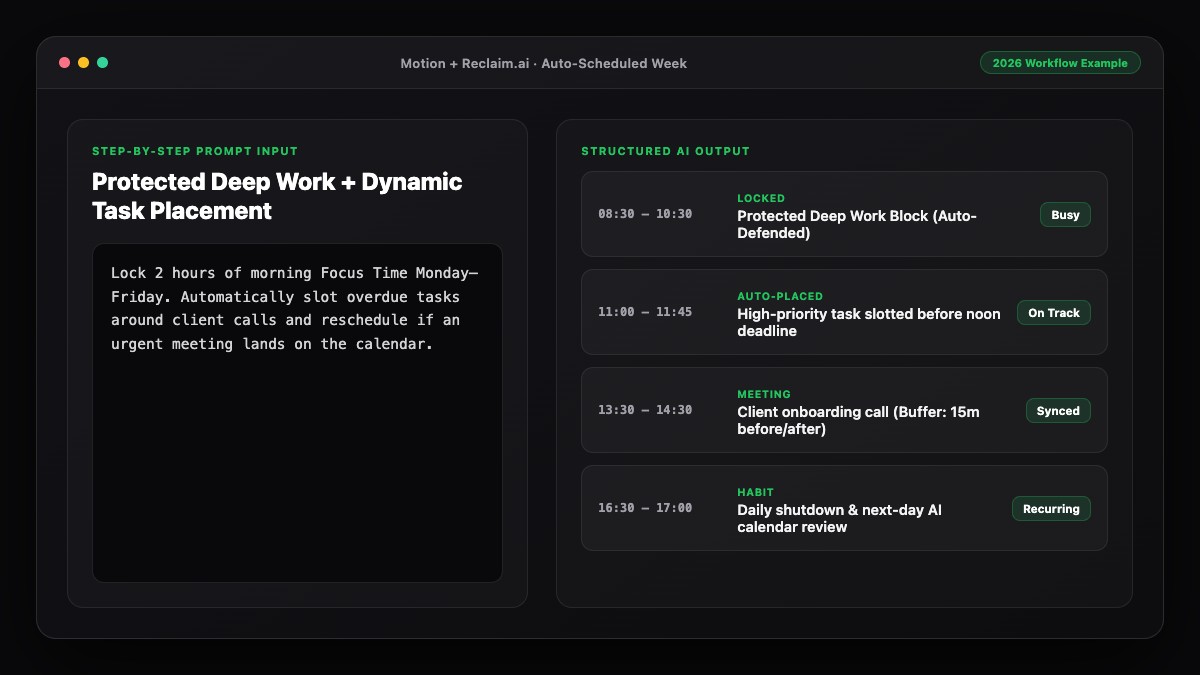
- Use Reclaim Smart 1:1s: Set a flexible window (e.g., "30 minutes, once a week, anytime Tuesday–Thursday afternoon"). Reclaim automatically picks the best mutual slot that avoids interrupting either person's focus blocks, and moves it seamlessly if a conflict arises.
- Constrain external booking links: In Motion or Google Calendar Appointment Schedules, restrict external guest bookings to designated meeting windows (such as 1:00 PM–4:00 PM) so your morning tasks stay untouched.
Step 3: Add Automatic Pre- and Post-Meeting Task Buffers
Every meeting creates hidden prep and follow-up work. If you schedule meetings back-to-back, those action items pile up until 6:00 PM.
- Decompression buffers: Configure 10- to 15-minute automatic buffers after external calls in Motion or Reclaim.ai.
- Use AI meeting notes to capture tasks instantly: After a call, feed the transcript or summary into Gemini or ChatGPT to extract owners, action items, and deadlines—then drop those tasks straight into your auto-scheduler during your 10-minute post-call buffer.
Step 4: Protect Task Time with Dynamic Conflict Rules
When a meeting invite arrives, your AI should decide whether to yield or hold the line based on deadline urgency:
- Flexible tasks (due next week): Stay marked as Free on your calendar so teammates can book over them, prompting the AI to slide the task to tomorrow.
- Urgent tasks (due today): Automatically flip to Busy so no new meeting can overwrite your deadline.
This exact mechanism is how high-output teams protect focus time using AI without appearing uncooperative.
Step 5: Run a Daily Meeting-vs-Task Capacity Check
Even the best AI cannot create hours out of thin air. At 4:45 PM each day, glance at tomorrow's unified calendar. If meetings consume more than 50% of your day and Motion or Reclaim flags tasks as "At Risk," take action immediately: convert a status call to async, delegate a task, or push a non-urgent deadline by 48 hours. Pair this with our 15-minute weekly AI planning routine to keep your workload balanced long-term.
Best Prompts to Copy and Paste
Use these prompts in ChatGPT or Gemini to turn messy meeting notes into scheduled tasks and rebalance meeting-heavy days.
Prompt 1: Turn Meeting Transcripts into Schedulable Tasks
Extract every action item assigned to me from the meeting notes below. Format each item for an AI task scheduler with:
- Clear verb-first task title
- Estimated duration (15, 30, 45, or 60 mins)
- Suggested deadline based on context
- Priority (High, Medium, Low)
- Whether it requires Deep Work or Admin/Light focus

Meeting notes:
[Paste transcript or summary]
Prompt 2: Balance a Meeting-Heavy Day
I have 5 hours of meetings today between 9:00 AM and 5:30 PM:
[Paste meeting times]

Here are the 6 tasks on my plate today with time estimates:
[Paste tasks + durations]

Tell me:
1. Which tasks realistically fit into the remaining gaps between meetings (and in which exact slots).
2. Which 2 tasks I should defer to tomorrow or delegate.
3. One short Slack message I can send to reschedule the lowest-value meeting on today's list.
Common Mistakes to Avoid
- Letting tasks sit in an unscheduled list: If a task is not on your calendar, your calendar will lie to you about how much free time you have for meetings.
- Never turning on post-meeting buffers: Back-to-back calls leave zero time to log action items, causing follow-ups to slip through the cracks.
- Marking every task as "Busy" immediately: Blocking your entire calendar with low-priority tasks frustrates teammates trying to schedule legitimate meetings. Use dynamic Free-to-Busy rules instead.
- Accepting vague meeting invites without agendas: Before accepting, ask for a 2-bullet agenda—or propose an async update—so you only trade task time for high-value conversations.
References & Official Sources
All workflows, pricing tiers, and feature capabilities in this guide were verified against the official platform documentation:
- Motion AI Calendar & Task Scheduler (www.usemotion.com)
- Reclaim.ai Smart Calendar Defense (reclaim.ai)
- Google Workspace Calendar & AI (workspace.google.com)
- OpenAI ChatGPT Official Platform (chatgpt.com)
- Google Gemini Official Assistant (gemini.google.com)
- KwiqRank AI Workflow Integration Guide — Internal methodology for combining AI tools into repeatable business processes.
Final Thoughts
When you manage meetings and tasks with AI on a single unified timeline, you stop choosing between being responsive to your team and finishing your own work. Connecting your task manager to Reclaim.ai or Motion, automating Smart 1:1s, and capturing post-call tasks immediately keeps both sides of your workday in sync. For a broader look at designing your ideal daily flow, check out how to use AI to plan your entire day or how to create a smart productivity schedule using AI, or reach out to our team for workflow guidance.
Your questions, answered in plain English
When meetings and tasks are separated, your calendar looks empty even when you have 10 hours of deliverables due. Putting tasks onto your calendar shows your true capacity and prevents overbooking.
Motion is ideal if you want tasks, calendar events, and booking links in one app. Reclaim.ai is ideal if you prefer keeping Google Calendar alongside external task tools like Asana, Todoist, or Linear.
In Reclaim.ai, you set a preferred frequency and time window for a recurring 1:1. The AI automatically finds the best mutual slot that avoids disrupting either person's focus time and reschedules it automatically if a conflict appears.
You can paste meeting transcripts or Gemini/Zoom summaries into ChatGPT to extract action items with durations and priorities, then drop them directly into your AI calendar during a 10-minute post-meeting buffer.
No. Both Motion and Reclaim.ai let you hide task titles from coworkers so colleagues only see "Busy" or "Focus Time" when checking your availability.
Restrict your Calendly, Motion, or Google Appointment Schedule availability to afternoon hours (e.g., 1:00 PM–4:30 PM), leaving mornings protected for deep-work tasks.
Still curious? Send us your question and a strategist will get back to you.

Want this done for you?
We can put this guide to work on your website. Start with a free audit.
Get my free auditWritten by KwiqRank Team
KwiqRank is a digital marketing agency in Mumbai, India, working with UK and US businesses on SEO, GEO, AEO, paid media and websites. We check facts against official sources, and tell you when something is unconfirmed. Spotted a mistake? Tell us and we will correct it.
Found this useful?
Talk to us about your site
Tell us what you are working on and we will say plainly what we would do first.