
How to Write a Blog Post Using AI Step by Step (That Actually Ranks)
A practical 5-step workflow to plan, outline, draft, fact-check, and optimize SEO blog posts using AI without sounding robotic.

- Read time
- 8 min read
- Sections
- 11
- FAQs answered
- 6
- Topic
- Writing & Content
To write a blog post using AI that actually ranks on Google and gets cited in AI search engines, use AI as a structured co-writer rather than a one-click article generator. Start with human-led keyword research and search intent analysis, build an expert-backed outline, draft section by section with your own examples and data, and finish with a rigorous human edit for accuracy, voice, and E-E-A-T.
Most AI-generated blog posts fail to rank because creators paste a single generic prompt like "Write a 1,500-word blog post about X" and hit publish. Search engines and readers immediately spot the repetitive phrasing, shallow advice, and lack of real-world experience. When you break the process into five focused stages—briefing, outlining, section-by-section drafting, fact-checking, and on-page optimization—you cut writing time by 60% while producing original content that outperforms purely manual drafts.
What You'll Need
You do not need expensive enterprise software to write high-ranking articles with AI. A single flagship language model paired with a grammar checker and a workspace is enough to run this entire workflow. Here is how the top tools compare across free and paid tiers:
| Tool | Best For | Free Tier | Paid Tier |
|---|---|---|---|
| ChatGPT | Rapid outlining, keyword clustering, and conversational drafting | Access to standard models with usage caps | ChatGPT Plus ($20/mo) for higher limits, Projects, and deep research |
| Claude | Natural, human-sounding prose and long-context editing | Daily message limits on current Sonnet models | Claude Pro ($20/mo) for Projects, Artifacts, and extended output |
| Gemini | Google Workspace integration and live web-grounded research | Standard Gemini access inside Google accounts | Google AI Pro ($19.99/mo) for Docs integration and deeper context |
| Grammarly | Final-pass grammar, clarity, and tone consistency | Basic spelling, grammar, and punctuation checks | Grammarly Pro ($12/mo billed annually) for full-sentence rewrites and tone |
| Notion AI | Managing content briefs, editorial calendars, and inline drafting | Limited trial AI responses inside Notion workspace | Notion Plus + AI add-on for unlimited workspace Q&A and drafting |
Step 1: Lock In Search Intent and Your Unique Angle
Before you write a single word, define who the post is for, what question they need answered immediately, and what original perspective you bring that top-ranking pages miss. AI cannot invent your first-hand experience, proprietary data, or customer stories—you must supply those upfront.
- Identify the primary keyword and intent: Check the top five Google results for your target query. Are they step-by-step tutorials, comparison tables, or definition guides? Match the dominant format.
- List 3–5 specific takeaways from your experience: Write bullet points covering mistakes you have seen clients make, real metrics, or specific tools you tested.
- Feed a structured brief to your AI: Give Claude or ChatGPT your target audience, search intent, primary keyword, and your raw bullet points before asking for an outline.
Step 2: Build an Answer-First Outline
Modern search engines and Answer Engines (like ChatGPT Search and Google AI Overviews) reward pages that answer the core question in the very first paragraph and use clear, logical H2 and H3 subheadings.
- Front-load the direct answer: Plan a 2–3 sentence lead paragraph that summarizes the entire solution clearly without fluff.
- Map H2s to real user sub-questions: Ask AI to review your topic and list the follow-up questions a beginner or practitioner would ask next. Turn those into H2 sections.
- Assign a word-count budget per section: Keep introductions tight (80–120 words) and dedicate 60% of your word count to actionable steps, examples, and comparisons.
Once your outline is locked, review it yourself. Cut any generic filler headings like "Why X Matters in Today's Digital World" and replace them with concrete, action-oriented subheadings.
Step 3: Draft Section by Section With Context
Never ask AI to write the full 1,500-word article in one prompt. Single-shot generation causes the model to rush through later sections, repeat transitions, and hallucinate statistics. Instead, draft one H2 section at a time.
- Provide style guardrails: Instruct the AI to use active voice, short paragraphs (2–4 sentences), concrete verbs, and zero clichés ("delve," "tapestry," "game-changer," "in today's fast-paced world").
- Inject your raw notes into each prompt: Tell the model which specific example, tool, or number belongs in that section so every paragraph feels grounded.
- Ask for structured formatting: Request numbered steps for processes, bulleted lists for criteria, and HTML or Markdown tables for tool comparisons.
If a section feels stiff or repetitive, use the techniques in our guide on how to rewrite content using AI without changing its meaning to tighten the prose while keeping your facts intact.
Step 4: Humanize, Fact-Check, and Add E-E-A-T
AI models are confident guessers. They frequently invent outdated pricing, misquote studies, or fabricate URLs. Your editorial pass is what separates a trustworthy resource from generic AI slop.
- Verify every claim and number: Check tool pricing, software features, and statistics against official documentation. Remove any unverified stat rather than leaving a guess.
- Run a clarity and grammar pass: Paste your draft into Grammarly or run an editing prompt to eliminate passive voice and redundant qualifiers. For a deeper workflow, see our guide on using AI to fix grammar and improve your writing.
- Add real-world friction: Include edge cases, "when NOT to use this approach," and honest trade-offs. Readers trust content that acknowledges limitations.
Step 5: Optimize Metadata, Internal Links, and FAQs
Before publishing, use AI to polish the technical SEO and Answer Engine Optimization (AEO) elements that help your post win clicks and citations.
- Write 5 title tag variations: Keep your primary keyword near the front and stay under 60 characters so Google does not truncate it.
- Craft a 150-character meta description: Include the primary keyword naturally and state the clear benefit of clicking.
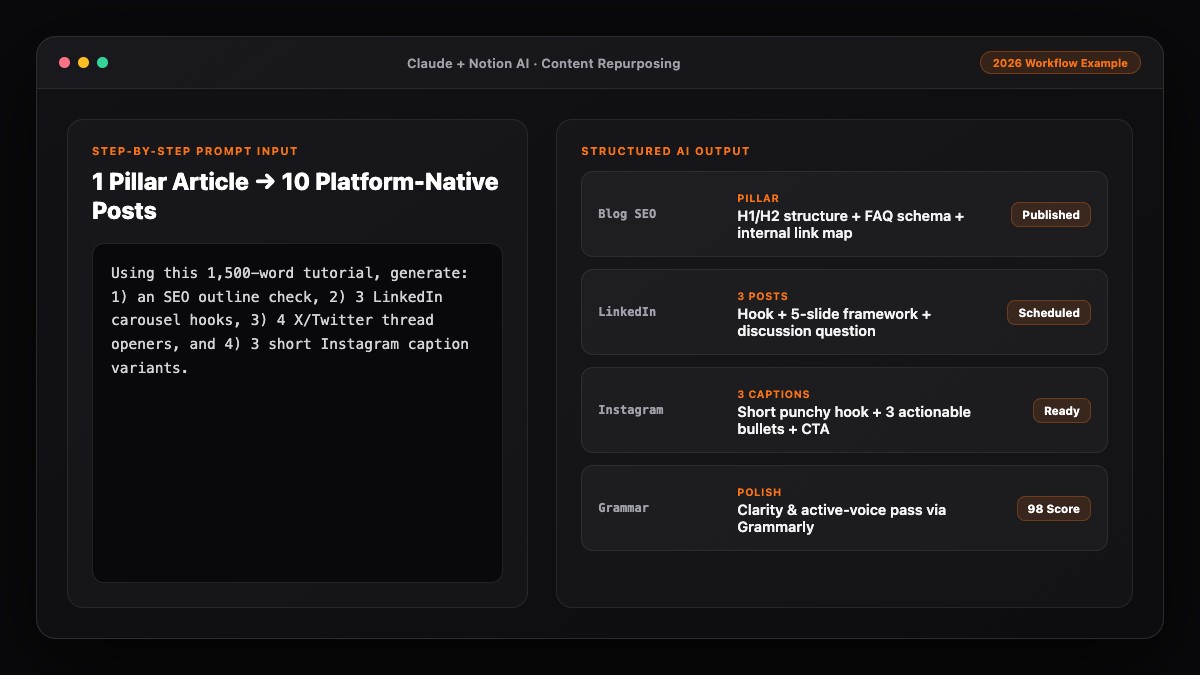
- Add strategic internal links: Link to related guides on your site—for example, showing readers how to turn one blog post into 10 social media posts using AI or build a full content calendar using AI.
- Generate 5–7 concise FAQs: Write 2-sentence answers to real "People Also Ask" questions at the bottom of the post.
Best Prompts to Copy and Paste
Use these three battle-tested prompts in ChatGPT, Claude, or Gemini to run the workflow above.
Prompt 1: Search-Intent Brief & Outline
Act as a senior SEO content strategist. I am writing a blog post targeting the keyword "[PRIMARY KEYWORD]" for [TARGET AUDIENCE].
Here are my unique insights and real examples to include:
- [Insight 1]
- [Insight 2]
- [Insight 3]

Create an answer-first outline with:
1. A 2-sentence lead paragraph angle that directly answers the main query.
2. 5–7 H2 headings mapped to logical sub-questions (no generic fluff headings).
3. Bullet points under each H2 showing where my insights should go and whether a table or checklist fits best.
Prompt 2: Section-by-Section Drafting
Write ONLY the "[H2 HEADING]" section of this blog post (approx. 200–250 words).
Rules:
- Use active voice, short paragraphs (2–3 sentences max), and concrete examples.
- Include this specific point: [YOUR INSIGHT/DATA].
- Do NOT use clichés like "delve," "unlock," "landscape," "tapestry," or "in today's fast-paced world."
- End with a natural transition sentence to the next section: "[NEXT H2 HEADING]".
Prompt 3: On-Page SEO & FAQ Polish
Review my completed blog draft below.
1. Suggest 3 SEO title tags (under 60 characters) containing "[PRIMARY KEYWORD]".
2. Write 2 meta descriptions (145–155 characters) containing "[PRIMARY KEYWORD]".
3. Write 6 concise FAQ questions and 2-sentence direct answers based on gaps or follow-up questions readers might have.
Common Mistakes to Avoid
- One-prompt full-article generation: Asking for a 1,500-word post in one shot guarantees shallow, repetitive paragraphs and weak conclusions.
- Publishing unverified stats or links: AI frequently invents plausible-sounding percentages and broken URLs. Always verify every number and link before publishing.
- Ignoring brand voice: Default AI prose sounds polite, overly formal, and vague. Edit sentences to sound like a knowledgeable colleague explaining the process over coffee.
- Skipping original examples: If your post contains zero personal screenshots, workflows, prompts, or real trade-offs, it offers search engines nothing new to rank.
References & Official Sources
All workflows, pricing tiers, and feature capabilities in this guide were verified against the official platform documentation:
- Anthropic Claude Official Workspace (claude.ai)
- OpenAI ChatGPT Official Platform (chatgpt.com)
- Grammarly Official Writing Assistant (www.grammarly.com)
- Notion AI Official Documentation (www.notion.so)
- Google Gemini Official Assistant (gemini.google.com)
- KwiqRank AI Workflow Integration Guide — Internal methodology for combining AI tools into repeatable business processes.
Final Thoughts
Learning how to write a blog post using AI is less about finding a magic prompt and more about building a repeatable editorial system. When you combine AI's speed at structuring and drafting with your own real-world expertise and fact-checking, you publish faster without sacrificing trust or rankings. To make sure your workflow aligns with search quality standards, read our breakdown of Google's guidelines on AI-generated content.
Your questions, answered in plain English
No. Google evaluates content based on helpfulness, accuracy, and E-E-A-T regardless of whether AI assisted in the process. Low-quality, unedited spam is penalized, not well-researched AI-assisted writing.
Claude is widely preferred for natural, human-sounding prose and long-context editing, while ChatGPT excels at keyword clustering, outlining, and structured brainstorming.
Using a 5-step workflow—briefing, outlining, section drafting, fact-checking, and SEO polishing—most writers complete a 1,500-word post in 60 to 90 minutes instead of 4 to 5 hours.
Ban common AI clichés in your prompt, draft one section at a time, inject specific examples from your own work, and read the final draft aloud to cut wordy transitions.
Yes. The free tiers of ChatGPT, Claude, Gemini, and Grammarly are enough to outline, draft, and proofread several blog posts per week, though paid plans offer higher usage limits.
Disclosure is optional for standard marketing blogs unless your industry or publication requires it, but human editorial accountability and factual verification are always essential.
Still curious? Send us your question and a strategist will get back to you.

Want this done for you?
We can put this guide to work on your website. Start with a free audit.
Get my free auditWritten by KwiqRank Team
KwiqRank is a digital marketing agency in Mumbai, India, working with UK and US businesses on SEO, GEO, AEO, paid media and websites. We check facts against official sources, and tell you when something is unconfirmed. Spotted a mistake? Tell us and we will correct it.
Found this useful?
Get recommended by AI search
We check whether Google, ChatGPT and Perplexity can reach your pages, then fix what blocks them. No guarantees, just a clear plan.