
How to Turn One Blog Post Into 10 Social Media Posts Using AI
Turn a single 1,500-word article into 10 native LinkedIn posts, X threads, Instagram carousels, and short video scripts in 20 minutes using AI.

- Read time
- 7 min read
- Sections
- 11
- FAQs answered
- 6
- Topic
- Writing & Content
To repurpose a blog post into social media using AI, extract the article's core insights, contrarian takeaways, checklists, and stats first, then map each distinct angle to a native social format—such as LinkedIn text posts, X threads, Instagram carousels, and short-form video scripts. Never ask AI to "summarize this blog post into 10 tweets," which produces 10 bland versions of the same link teaser.
Most teams spend five hours writing a great blog post, share it once with "New on the blog! 👇" and let it die. That single article already contains enough verified insights, step-by-step frameworks, and FAQs to fuel two weeks of social media. With a structured 5-step extraction workflow, AI turns one URL or draft into 10 distinct, standalone social assets in 20 minutes.
What You'll Need
Repurposing requires a model with a large enough context window to read your full 1,500-word article without forgetting the beginning. Here is how the top tools compare:
| Tool | Best For | Free Tier | Paid Tier |
|---|---|---|---|
| Claude | Reading full long-form articles and writing natural, varied social posts | Daily limits on Sonnet models with large context | Claude Pro ($20/mo) for Projects and multi-post Artifacts |
| ChatGPT | Structuring 10-post matrices, X threads, and carousel slide decks | Standard access with usage limits | ChatGPT Plus ($20/mo) for Custom GPTs and fast batching |
| Gemini | Pulling directly from Google Docs drafts into social formats | Standard Gemini web access | Google AI Pro ($19.99/mo) for Docs/Sheets workflow integration |
| Grammarly | Polishing hooks and tightening character counts on X posts | Basic grammar and spelling checks | Grammarly Pro ($12/mo billed annually) for conciseness rewrites |
| Notion AI | Generating social drafts directly inside your blog's Notion database | Limited trial AI responses | Notion Plus + AI add-on for one-click database repurposing |
Step 1: Audit Your Blog Post for Standalone Nuggets
Before generating any posts, have AI mine your article for raw material. A single 1,500-word tutorial usually holds at least five different types of social-ready nuggets:
- The core framework: Your numbered 3-to-5-step process.
- The contrarian insight: What most people get wrong (usually found in your "Common Mistakes" section).
- A comparison table: Tool vs. tool or before vs. after.
- A quotable rule of thumb: A crisp 1-sentence principle buried in a paragraph.
- FAQ micro-answers: Individual Q&As that work as standalone Q&A posts.
If you haven't drafted the source article yet, start with our guide on how to write a blog post using AI step by step so your post is already packed with structured takeaways.
Step 2: Map the 10-Post Distribution Matrix
Variety is what keeps your followers engaged. Instead of 10 identical text updates, assign each extracted nugget to a specific format across platforms:
- Posts 1–2 (LinkedIn): A step-by-step breakdown post + a "Common Mistakes to Avoid" post.
- Posts 3–4 (Instagram Carousels): A 7-slide visual framework + a 5-slide tool comparison.
- Posts 5–6 (X / Twitter): A 6-tweet tactical thread + a punchy single-tweet contrarian take.
- Posts 7–8 (Short-Form Video Scripts): Two 45-second Reel/TikTok/Shorts talking-head scripts based on your lead answer and one FAQ.
- Post 9 (Newsletter Teaser): A 100-word value-first summary with a link to read the full guide.
- Post 10 (Engagement Poll / Question): A debate starter pulled from the article's biggest trade-off.
Step 3: Generate the 10 Posts in Two Focused Batches
Asking AI for all 10 posts in one massive prompt causes quality to drop after post #4. Split generation into two batches of five so the model maintains sharp hooks and strict formatting.
- Batch 1: Written posts (2 LinkedIn posts, 1 X thread, 1 single X post, 1 newsletter blurb).
- Batch 2: Visual and video scripts (2 Instagram carousel slide decks, 2 short-form video scripts, 1 poll).
Remind the AI that every post must deliver full value inside the feed—readers should learn something useful even if they never click the blog link. For more platform-specific formatting tips, see our guide on creating social media content using AI.
Step 4: Sharpen Hooks and Strip Blog Transitions
Blog prose reads slower than social feeds. When AI repurposes an article, it often leaves behind blog-style transitions like "As mentioned earlier" or "In this section, we will explore."
- Delete every meta-reference: Remove phrases like "In our latest blog post..." from the opening line. Lead with the insight, not the announcement.
- Upgrade the first 2 lines: Make sure every post opens with tension, a specific result, or a clear mistake.
- Tighten captions: Check our AI caption writing guide to match character limits and mobile truncation points on Instagram, LinkedIn, and X.
Step 5: Stagger Publishing Across Your Calendar
Do not dump all 10 posts in the same week. Space them out over 2 to 4 weeks so each angle reaches different segments of your audience without feeling repetitive.
- Week 1: Publish the LinkedIn framework, Instagram carousel #1, and X thread.
- Week 2: Publish the short-form video script #1, contrarian X post, and newsletter teaser.
- Week 3–4: Publish the "Common Mistakes" LinkedIn post, carousel #2, video script #2, and poll.
Slot these assets straight into your monthly plan using our workflow for creating a content calendar using AI.
Best Prompts to Copy and Paste
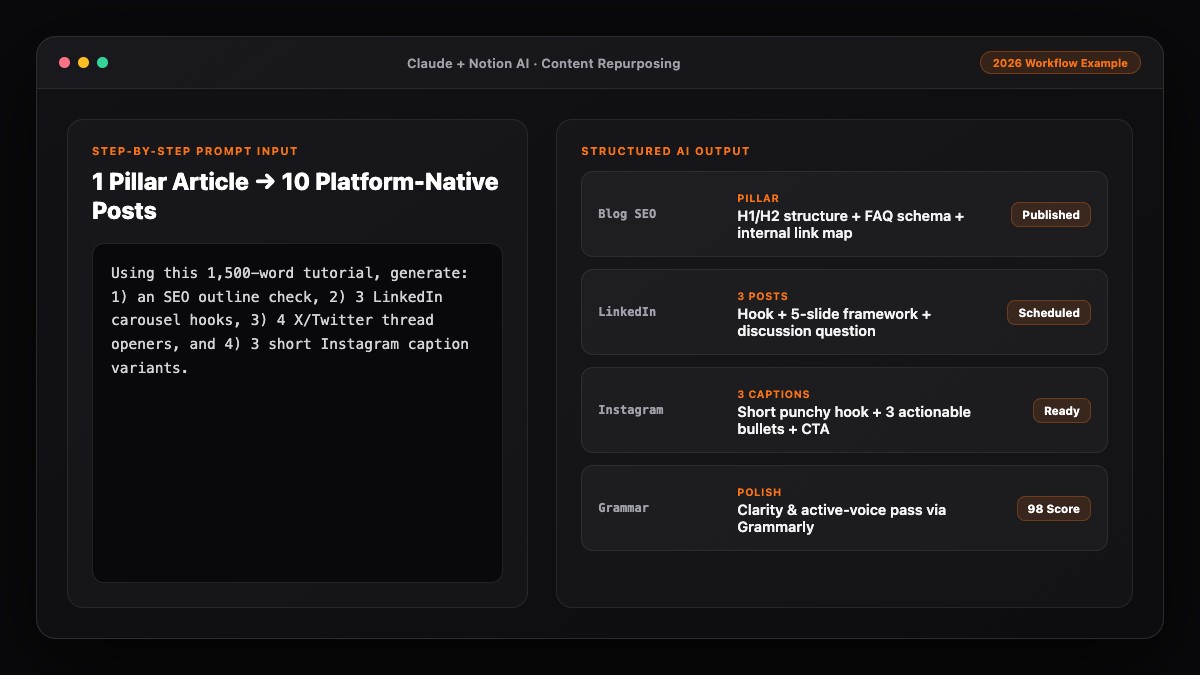
Paste your full blog post into Claude or ChatGPT and run these three prompts in sequence.
Prompt 1: Extract Standalone Nuggets
Read the blog post below and extract 10 distinct, standalone social media angles:
- 2 step-by-step frameworks
- 2 common mistakes or contrarian takes
- 2 data points, comparisons, or tool breakdowns
- 2 quick-win tips or FAQs
- 2 story/debate prompts

Do not write the posts yet—just list the 10 angles with a 1-sentence summary for each.

Blog Post:
[PASTE FULL BLOG POST]
Prompt 2: Batch 1 (Written Social Posts 1–5)
Using angles 1–5 from above, write 5 native social posts that deliver full value in the feed without requiring a click:
1. LinkedIn Post (150 words, strong 2-line hook, short paragraphs, 1 question at the end)
2. LinkedIn "Mistakes" Post (140 words, bulleted list, direct tone)
3. X Thread (6 tweets, under 260 chars each, no hashtags)
4. Single X Post (under 240 chars, contrarian observation)
5. Newsletter Blurb (100 words + 1 natural CTA to read the full guide)
Prompt 3: Batch 2 (Carousels, Video Scripts & Poll 6–10)
Using angles 6–10 from above, write:
6. Instagram Carousel #1 (7 slides: Slide 1 hook, Slides 2–6 max 15 words each, Slide 7 CTA + 50-word caption)
7. Instagram Carousel #2 (5-slide comparison + 50-word caption)
8. Short-Form Video Script #1 (45 seconds, ~105 words, spoken conversational tone, 3-second visual hook)
9. Short-Form Video Script #2 (30 seconds, ~75 words, answering 1 FAQ directly)
10. LinkedIn/X Engagement Poll (1 question + 3–4 short poll options)
Common Mistakes to Avoid
- Writing 10 "Check out our new blog!" teasers: Social algorithms suppress link-heavy posts that offer zero value on the platform itself.
- Generating all 10 posts in one prompt: Quality degrades rapidly after the fourth or fifth output; always split into two batches.
- Leaving blog-style phrasing intact: Phrases like "as discussed above" make no sense to someone scrolling Instagram or X.
- Posting all 10 pieces in 48 hours: Stagger them over 2 to 4 weeks to maximize reach and keep your feed varied.
References & Official Sources
All workflows, pricing tiers, and feature capabilities in this guide were verified against the official platform documentation:
- Anthropic Claude Official Workspace (claude.ai)
- OpenAI ChatGPT Official Platform (chatgpt.com)
- Grammarly Official Writing Assistant (www.grammarly.com)
- Notion AI Official Documentation (www.notion.so)
- Google Gemini Official Assistant (gemini.google.com)
- KwiqRank AI Workflow Integration Guide — Internal methodology for combining AI tools into repeatable business processes.
Final Thoughts
When you repurpose a blog post into social media using AI, you stop treating long-form writing as a one-and-done effort and turn every article into a multi-week distribution engine. Extract distinct angles, match each one to a native format, and polish the hooks before scheduling. For a bigger-picture view on how long-form and social content work together, explore our content marketing strategy guide.
Your questions, answered in plain English
Yes. By pasting your full article into Claude or ChatGPT with a structured 2-batch prompt, you can generate 10 platform-native posts—including carousels, threads, and video scripts—in about 20 minutes.
No. Social platforms often limit the reach of external links. Make 8 of the 10 posts standalone value posts and put the blog link in your newsletter blurb or in the first comment where appropriate.
Long single-turn outputs cause models to rush and repeat phrasing. Extracting 10 angles first and generating two batches of 5 posts keeps every hook sharp.
Claude handles long articles (1,500–3,000+ words) exceptionally well without losing context, while ChatGPT is great for structured thread and carousel formatting.
Spread them across 2 to 4 weeks and alternate platforms and formats so your audience never feels like they are reading the same article twice in a row.
Yes—just update any outdated statistics or screenshots first, or use AI to refresh the facts before running the 10-post extraction workflow.
Still curious? Send us your question and a strategist will get back to you.

Want this done for you?
We can put this guide to work on your website. Start with a free audit.
Get my free auditWritten by KwiqRank Team
KwiqRank is a digital marketing agency in Mumbai, India, working with UK and US businesses on SEO, GEO, AEO, paid media and websites. We check facts against official sources, and tell you when something is unconfirmed. Spotted a mistake? Tell us and we will correct it.
Found this useful?
Get recommended by AI search
We check whether Google, ChatGPT and Perplexity can reach your pages, then fix what blocks them. No guarantees, just a clear plan.