
How to Convert Meeting Conversations Into Action Items Using AI
Turn rambling meeting transcripts into clear task tables with single owners, deadlines, and dependencies using Otter.ai, Fireflies.ai, Notion AI, and ChatGPT.

- Read time
- 7 min read
- Sections
- 11
- FAQs answered
- 6
- Topic
- Meetings & Notes
To convert meetings to action items AI workflows effectively, capture the call transcript with a meeting assistant like Otter.ai or Fireflies.ai, extract every commitment using a structured prompt in ChatGPT, Claude, or Notion AI, and map each item to a single owner, concrete deliverable, and due date.
Most meetings fail not because the conversation was bad, but because nothing happens after everyone clicks "Leave." People walk away with vague impressions like "we should look into pricing" or "someone needs to follow up with marketing," and a week later the exact same topic is back on the agenda.
AI solves this accountability gap by reading the entire conversation objectively. Unlike a tired human note-taker who only catches the last five minutes, AI scans every turn of dialogue—including offhand promises made in minute 14—and turns conversational chatter into a clean task table ready for Notion, Asana, Jira, or Slack.
What You'll Need
Turning talk into tracked tasks requires two pieces: an accurate transcript source and an AI extraction engine. Many platforms combine both, while pairing a dedicated transcriber with ChatGPT or Notion AI gives you tighter control over formatting.
| Tool | Free Tier | Paid Tier | Action-Item Strength |
|---|---|---|---|
| Otter.ai | 300 monthly minutes with basic automated summaries | Pro/Business plans add automated action-item assignment and team workflows | Automatically tags action items inline next to speaker quotes |
| Fireflies.ai | Free transcription credits and basic AI task extraction | Paid tiers unlock AI Apps, CRM task sync, and Slack/Asana automations | Pushes extracted tasks directly into project management tools |
| Zoom AI Companion | Included with eligible paid Zoom Workplace accounts | Included in qualifying paid Zoom Workplace plans | Generates "Next Steps" automatically right inside Zoom |
| Notion AI | Limited trial AI usage on free workspaces | Paid AI add-on / Business & Enterprise plans | Turns meeting pages directly into Notion database tasks |
| ChatGPT | Free tier with daily message limits | Plus/Team plans offer higher limits and reusable custom GPTs | Best for custom task tables, priority scoring, and blocker detection |
Step 1: Capture a Speaker-Labeled Transcript
You cannot reliably assign tasks if the transcript just reads like an anonymous wall of text. Before extracting action items, make sure your recording tool identifies individual speakers.
- Run your meeting through Otter.ai, Fireflies.ai, or Zoom AI Companion with speaker labels enabled (see our guide on how to take meeting notes automatically using AI if you have not set this up yet).
- Quickly verify that first names are spelled correctly at the top of the transcript—for example, distinguishing "Sarah K." from "Sara M."
- If you forgot to record a short ad-hoc call, record a 60-second voice recap right afterward and follow our workflow to turn voice notes into organized notes using AI.
Step 2: Use Verbal Commitment Cues During the Call
AI models are great at spotting explicit promises ("I'll send the spreadsheet by Friday"), but they struggle with ambiguous brainstorming ("We could maybe test a new landing page"). You can double extraction accuracy with a simple facilitation habit:
- Close every topic with an owner: Ask, "Who owns the next step here, and when should we check back?"
- State dependencies aloud: Say, "Action item for Marcus: update the API docs once Elena approves the schema on Wednesday."
- Separate ideas from commitments: Explicitly say "Let's park that in the backlog" when something is just an idea so the AI does not turn every brainstormed thought into an urgent task.
Step 3: Extract Tasks With Strict Anti-Hallucination Rules
Generic prompts like "List the action items from this meeting" often produce vague tasks without owners or invented deadlines. Instead, instruct ChatGPT, Claude, or Notion AI to separate confirmed commitments from unassigned suggestions.
Require four columns for every extracted item:
- Action Item: Start with a strong verb ("Draft," "Approve," "Send," "Schedule").
- Owner: One person's name—never "Team" or "Everyone." If unclear, mark
Unassigned (Needs Owner). - Due Date: Exact date or timeframe mentioned; otherwise mark
TBD. - Context / Blocker: One short phrase explaining why it matters or what it depends on.
Step 4: Audit Unassigned and Implied Tasks
Spend two minutes reviewing the AI output before sharing it. Pay special attention to the "Unassigned" bucket—those are the exact tasks that usually fall through the cracks.
- Assign missing owners: If two people discussed a task without naming an owner, tag the person best positioned to drive it and ask for confirmation in your follow-up message.
- Convert relative dates: If someone said "next Tuesday" on a Thursday call, replace "next Tuesday" with the actual calendar date so nobody misreads it later.
- Trim non-actionable noise: Delete polite remarks like "Let's stay in touch" or "Happy to chat more anytime" that AI occasionally flags as tasks.
Step 5: Sync Action Items Into Your Task Manager
Action items only get completed when they live inside the system your team checks every morning.
- Notion: Paste the AI-generated table directly into a Notion meeting page, highlight the rows, and use Notion AI or drag-and-drop to turn each row into a live task inside your Tasks database.
- Slack or Microsoft Teams: Post a clean checklist in the project channel tagging each owner with
@nameand the due date. - Fireflies.ai Automations: On paid plans, connect Fireflies directly to Asana, Trello, Jira, or HubSpot so spoken action items create draft tickets automatically.
Best Prompts to Copy and Paste
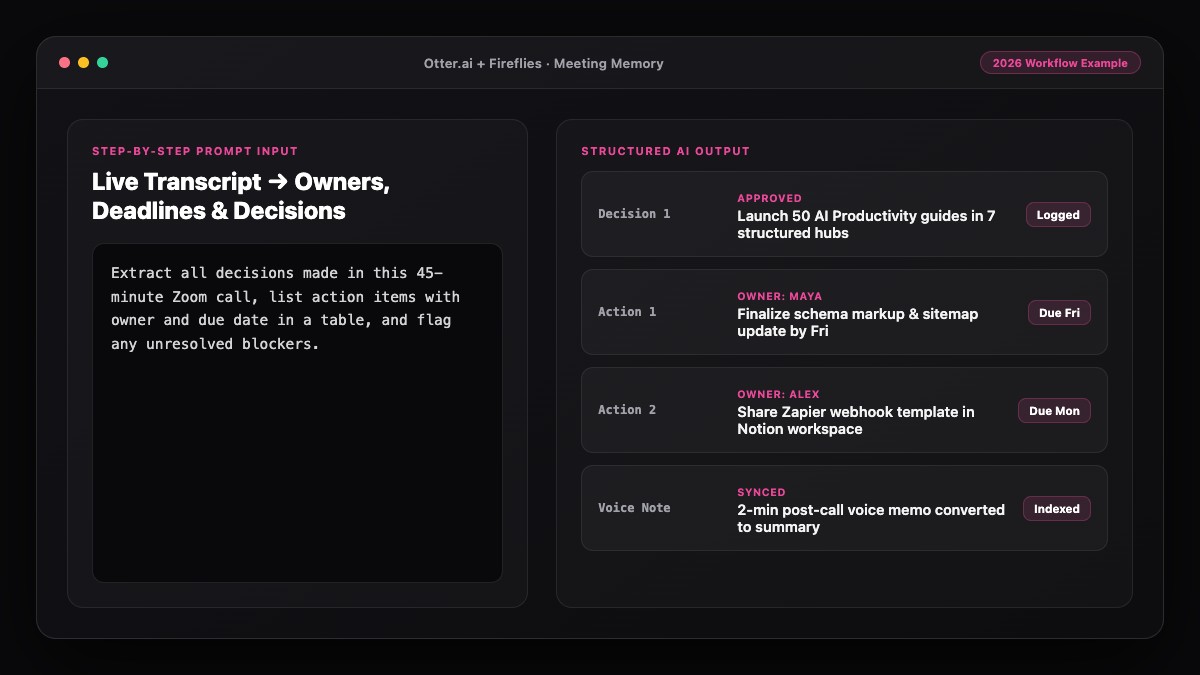
Use these copy-paste prompts with any meeting transcript in ChatGPT, Claude, or Notion AI.
Prompt 1: Strict Action-Item Extractor (Table Format)
Analyze the meeting transcript below and extract ONLY real next steps and commitments.

Output two sections:
1. CONFIRMED ACTION ITEMS (Markdown table with columns: Action Item | Owner | Due Date | Dependency/Context)
- Start every Action Item with an action verb.
- Assign exactly one Owner. If no owner was named, write "UNASSIGNED".
- If no deadline was spoken, write "TBD" — do not guess dates.

2. SUGGESTED IDEAS / PARKING LOT (bullet list of ideas mentioned without commitment)

Transcript:
[PASTE TRANSCRIPT HERE]
Prompt 2: Slack / Email Follow-Up Checklist
Turn the action items from this transcript into a concise Slack recap message.
Format:
- 1-sentence meeting outcome
- Bullet list grouped by person (@FirstName): task + deadline
- 1 line at the bottom listing any unresolved blockers or missing owners

Keep the entire message under 150 words.

Transcript:
[PASTE TRANSCRIPT HERE]
Common Mistakes to Avoid
- Letting AI invent deadlines: Unless you explicitly tell the model to write "TBD" for missing dates, some LLMs will guess "End of week." Always enforce a strict anti-guessing rule.
- Assigning tasks to "We" or "Team": Shared ownership equals zero ownership. Every confirmed action item needs one named individual.
- Overloading the task list: Turning 25 brainstorming remarks into tasks creates alert fatigue. Separate your confirmed commitments from your parking-lot ideas.
- Skipping the 2-minute human check: Misheard numbers, wrong dates, or misattributed speakers can embarrass you in front of clients or leadership.
References & Official Sources
All workflows, pricing tiers, and feature capabilities in this guide were verified against the official platform documentation:
- Otter.ai Official Meeting Assistant (otter.ai)
- Fireflies.ai Official Meeting Notetaker (fireflies.ai)
- Zoom AI Companion Official Platform (zoom.us)
- Notion AI Official Documentation (www.notion.so)
- OpenAI ChatGPT Official Platform (chatgpt.com)
- KwiqRank AI Workflow Integration Guide — Internal methodology for combining AI tools into repeatable business processes.
Final Thoughts
When you convert meetings to action items using AI, every call ends with crystal-clear ownership instead of vague intentions. Combine a reliable transcript with a strict extraction prompt, audit the unassigned items in two minutes, and drop the checklist straight into your team's daily workspace.
To keep those commitments searchable weeks later, read our guide on building an AI meeting memory and search system—or if you are working from dense project briefs before the meeting, see how to turn a long document into easy notes with AI.
Your questions, answered in plain English
Fireflies.ai and Otter.ai both extract action items automatically after a call, while ChatGPT, Claude, and Notion AI give you the highest accuracy when you want custom tables, dependency tracking, and Slack-ready checklists.
Use a two-part prompt that instructs the AI to place explicit commitments in a Confirmed Action Items table and move unowned suggestions into a separate Parking Lot list.
Instruct your AI prompt to write "TBD" whenever no date or timeframe is explicitly spoken. Then fill in realistic target dates during your two-minute post-call review.
Yes, as long as your transcript includes last names or initials from the video call roster. Double-check speaker labels before running your extraction prompt.
Fireflies.ai offers native integrations on paid plans to push tasks to Asana, Jira, and Trello. You can also paste a Markdown table from ChatGPT or Claude straight into Notion to create database items.
Usually one to two minutes. You only need to confirm unassigned tasks, convert relative dates like "next Friday" into calendar dates, and remove conversational filler.
Still curious? Send us your question and a strategist will get back to you.

Want this done for you?
We can put this guide to work on your website. Start with a free audit.
Get my free auditWritten by KwiqRank Team
KwiqRank is a digital marketing agency in Mumbai, India, working with UK and US businesses on SEO, GEO, AEO, paid media and websites. We check facts against official sources, and tell you when something is unconfirmed. Spotted a mistake? Tell us and we will correct it.
Found this useful?
Get recommended by AI search
We check whether Google, ChatGPT and Perplexity can reach your pages, then fix what blocks them. No guarantees, just a clear plan.