
How to Use AI to Create a Better Morning Routine
Build a modular 3-tier AI morning routine (Full, Standard, and 5-Minute Minimum) and replace doomscrolling with a calm 2-minute daily briefing.

- Read time
- 6 min read
- Sections
- 11
- FAQs answered
- 6
- Topic
- Everyday Productivity
To create a better AI morning routine, use an AI assistant to design a realistic, 20-to-45-minute sequence tailored to your wake-up time, energy style, and household constraints—and pair it with a 3-minute AI morning briefing that replaces doomscrolling with a single clear priority. Most morning routines fail because they copy rigid 5:00 AM influencer checklists (ice baths, 60-minute journaling, hour-long workouts) that shatter the moment you sleep poorly or have an early call. AI builds a modular routine with "Full," "Standard," and "10-Minute Emergency" versions so you stay consistent every single day.
How you spend your first 30 minutes sets the cognitive tone for the next 12 hours. By removing morning decision fatigue and replacing reactive phone checking with a calm, AI-guided launchpad, you start work focused instead of frazzled.
What You'll Need
Keep your morning tech minimal—ideally one voice-capable AI app and one simple checklist tracker so you do not get sucked into your inbox.
| Tool | Free Tier Capabilities | Paid Tier Capabilities | Best Role in Your Morning Routine |
|---|---|---|---|
| ChatGPT | Routine design, 3-minute voice check-ins, daily affirmation/focus prompts | Voice Mode conversations, Memory for tracking your energy patterns | Hands-free 3-minute morning briefing while making coffee |
| Claude | Customizing modular 10/30/45-minute routines, reflective journal prompts | Projects to store your long-term health and focus habits | Designing realistic habit stacks and weekly adjustments |
| Gemini | Quick weather/news summaries without falling into social feeds | Workspace summary of today's Google Calendar and urgent emails | One-screen morning briefing without opening Gmail |
| Todoist | Recurring daily morning checklist, streak-free gentle reminders | Calendar view and custom morning-only filter | Checking off your 3-step morning launchpad |
| Notion | Simple daily habit tracker and 3-line morning journal template | Notion AI to summarize weekly mood and energy trends | Logging quick morning reflections and habit streaks |
| Motion | 7-day trial only | Protects your morning deep-work block from early meeting invites | Defending your post-routine focus hour |
| ClickUp | Personal habit lists and daily recurring checklists | ClickUp Brain for instant daily "What's on my plate?" summaries | Reviewing work priorities right after your personal routine |
Step 1: Tell AI Your Real Mornings, Not Your Ideal Mornings
Be brutally honest about your wake-up time, commute, kids or pets, and when your first meeting starts. If you wake up at 7:15 AM and need to be online by 8:30 AM, asking for a 90-minute routine is setting yourself up to quit by Thursday.
Tell Claude or ChatGPT what currently derails your mornings (for example, checking Slack in bed or skipping breakfast) and ask it to design around those exact friction points.
Step 2: Build Three Modular Tiers (Full, Standard, and Minimum)
Consistency beats intensity. Have the AI generate three versions of your routine using the same core pillars (Hydration/Movement, Mind Clarity, Top Priority):
- Full Routine (45 min): Normal mornings—light stretching or walk, coffee, 5-minute reflection, and deep-work launch.
- Standard Routine (20 min): Busy days—water, 5-minute mobility, 2-minute AI briefing.
- Minimum Viable Routine (5 min): Travel or poor-sleep days—glass of water, 3 deep breaths, confirm #1 task.
Having a 5-minute fallback prevents one rough night from breaking your momentum for the rest of the week.
Step 3: Replace Doomscrolling With a 3-Minute AI Briefing
Opening email or social media in bed hijacks your brain with other people's emergencies. Instead, use ChatGPT Voice Mode or Gemini for a calm 3-minute check-in while your coffee brews: state how you slept, review your pre-planned #1 priority, and ask for one encouraging focus cue. If you have not set your daily schedule yet, follow our 5-minute guide to use AI to plan your entire day.
Step 4: Script a Frictionless Transition Into Deep Work
The hardest moment of the morning is bridging the gap between "routine finished" and "actually starting work." Ask AI to create a 2-minute shutdown-to-startup bridge: close 15 leftover browser tabs, put your phone in another room, and open only the single document needed for your #1 task. You can pair this with a clean AI-generated daily to-do list waiting on your desk.
Step 5: Review and Tweak Your Routine Every Two Weeks
Track how your morning feels for 14 days in Notion or Todoist. If you keep skipping a step—like 15 minutes of journaling—tell your AI assistant: "I skipped journaling 9 out of 14 days. Replace it with a 60-second voice prompt instead."
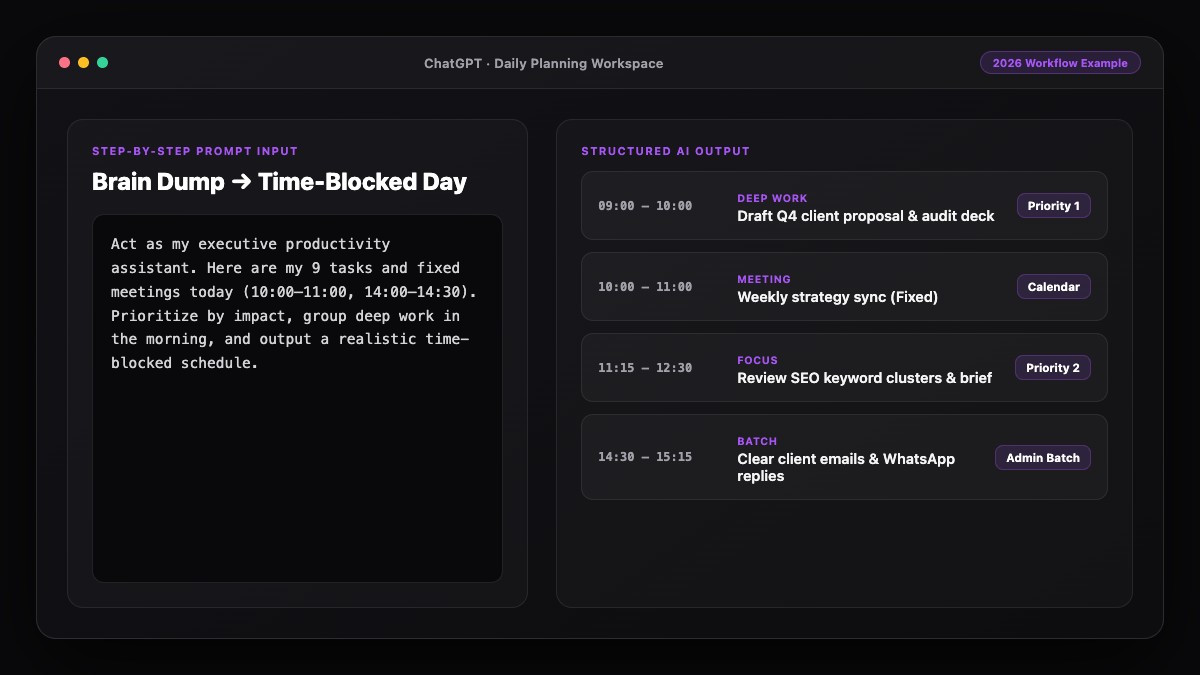
Best Prompts to Copy and Paste
Use these prompts to build and run your morning routine.
1. Custom 3-Tier Morning Routine Builder
Design a realistic, science-backed morning routine for me.
My details:
- Wake-up time: [TIME]
- Work start time: [TIME]
- Household constraints: [e.g., 20-min commute, walking the dog, kids' breakfast]
- Current bad habit to replace: [e.g., scrolling news/email in bed for 30 mins]
- Main goal: [e.g., higher morning energy and starting deep work calmly]

Create three versions I can choose from each day:
1. Full Version (40-45 mins)
2. Standard Version (20 mins)
3. Minimum Viable Version (5 mins for chaotic mornings)

Include exact minute-by-minute steps and one tip to make the first step effortless the night before.
2. The 2-Minute Coffee Briefing Prompt
Good morning. I slept [well / okay / poorly] and my energy is [1-10].
My top priority today is: [TASK]. My main meeting is at [TIME].
Give me:
1. One 2-sentence mindset reframe for my energy level today.
2. A concrete 10-minute "starter action" to build momentum on my top priority right now.
Common Mistakes to Avoid
- Designing an aspirational 5 AM routine when you are a night owl: Build around your natural chronotype, not someone else's podcast schedule.
- Checking Slack or Gmail inside your AI morning briefing: Keep the first 30 minutes free of incoming requests so your brain stays proactive.
- Adding too many new habits at once: Change at most two morning behaviors in week one before layering on extras.
- Forgetting night-before prep: Laying out your mug, notebook, and top task the evening before cuts morning friction in half.
References & Official Sources
All workflows, pricing tiers, and feature capabilities in this guide were verified against the official platform documentation:
- OpenAI ChatGPT Official Platform (chatgpt.com)
- Anthropic Claude Official Workspace (claude.ai)
- Google Gemini Official Assistant (gemini.google.com)
- Notion AI Official Documentation (www.notion.so)
- Todoist Official Task Manager (todoist.com)
- KwiqRank AI Workflow Integration Guide — Internal methodology for combining AI tools into repeatable business processes.
Final Thoughts
An AI morning routine works because it adapts to real life instead of demanding perfection. With a modular three-tier plan and a 2-minute briefing, you protect your calmest hours and launch straight into meaningful work. Want to connect your morning routine to a full-day and weekly framework? Read our guide on how to use AI to organize your life in 2026 or reach out to our team for custom productivity workflows.
Your questions, answered in plain English
AI analyzes your wake-up time, commute, family duties, and energy patterns to build a realistic, minute-by-minute routine with fallback versions for busy mornings.
It is a flexible system with a Full version (45 min) for normal days, a Standard version (20 min) for busy days, and a Minimum version (5 min) for chaotic mornings so you never lose momentum.
If your phone tempts you into email or social media, use Voice Mode hands-free without opening other apps, or prepare your 2-minute briefing on your laptop after breakfast.
ChatGPT Voice Mode is great for hands-free morning check-ins, Claude is ideal for designing habit stacks, and Todoist or Notion works well for checking off your daily steps.
Between 20 and 45 minutes on most days, with a 5-minute emergency option. Consistency matters far more than duration.
Tell your AI assistant which step you keep skipping after two weeks and ask it to shrink or replace that step with a 60-second alternative.
Still curious? Send us your question and a strategist will get back to you.

Want this done for you?
We can put this guide to work on your website. Start with a free audit.
Get my free auditWritten by KwiqRank Team
KwiqRank is a digital marketing agency in Mumbai, India, working with UK and US businesses on SEO, GEO, AEO, paid media and websites. We check facts against official sources, and tell you when something is unconfirmed. Spotted a mistake? Tell us and we will correct it.
Found this useful?
Get recommended by AI search
We check whether Google, ChatGPT and Perplexity can reach your pages, then fix what blocks them. No guarantees, just a clear plan.