
How to Use AI to Organize Your Life in 2026
Build a calm, low-maintenance life operating system using AI to manage tasks, meals, digital files, and recurring admin in 15 minutes a week.

- Read time
- 7 min read
- Sections
- 11
- FAQs answered
- 6
- Topic
- Everyday Productivity
To use AI to organize your life in 2026, stop treating AI as a one-off search bar and instead build four connected hubs—Tasks & Calendar, Notes & Knowledge, Home & Routines, and Finances & Admin—using an AI assistant to capture, categorize, and review information automatically. Most people feel disorganized not because they lack discipline, but because information lives across 14 disconnected apps, sticky notes, and browser tabs. AI acts as the universal translator that turns scattered inputs into one calm, searchable system.
In 2026, organizing your life does not require color-coded binders or hours of weekend filing. With modern context windows, voice capture, and lightweight integrations, you can set up a low-maintenance life operating system in a single afternoon.
What You'll Need
Pick one primary AI brain and one home base for your documents and tasks. Keeping your stack minimal is the secret to sticking with it.
| Tool | Free Tier Capabilities | Paid Tier Capabilities | Best Role in Life Organization |
|---|---|---|---|
| ChatGPT | Voice capture, quick meal/travel/budget planning, file reading | Persistent memory, Projects for separate life areas (Home, Work, Health) | Daily capture, brainstorming, and personal SOP creation |
| Claude | Clean document drafting, structured tables, thoughtful life audits | Projects with uploaded PDFs, tax checklists, and family schedules | Deep organization of complex plans and long documents |
| Gemini | Fast answers, Google Maps/YouTube context, checklist creation | Deep integration across Gmail, Drive, Docs, and Google Calendar | Organizing Google-heavy personal and family workflows |
| Notion | Unlimited personal pages, databases for habits, trips, and warranties | Notion AI Q&A across your entire workspace and auto-filled tables | Your central "Second Brain" and life dashboard |
| Todoist | Recurring chores, shopping lists, 5 personal projects | Calendar view, location/time reminders, AI Filter Assistant | Never forgetting recurring bills, errands, or birthdays |
| Motion | 7-day trial only | Auto-schedules personal errands and work tasks onto one calendar | Balancing busy workdays with personal appointments |
| ClickUp | Unlimited lists, folders for Home, Finance, and Side Projects | ClickUp Brain for instant status summaries and task generation | Structured life-project tracking with checklists |
Step 1: Audit Your Four Core Life Buckets
Before moving a single file, ask AI to help you map where chaos actually lives. Almost every personal bottleneck falls into four buckets: Time & Tasks, Home & Meals, Money & Paperwork, and Digital Files & Notes.
Spend five minutes writing down what stresses you out most in each bucket—like missed bill due dates, 6:00 PM "what's for dinner?" panic, or 4,000 messy screenshots. Knowing your top two friction points keeps you from over-engineering areas that already work fine.
Step 2: Create One Frictionless Inbox for Everything
Organization breaks down when capture takes too many clicks. Set up a single "Life Inbox"—either a quick-add widget in Todoist, a pinned page in Notion, or a dedicated voice chat in ChatGPT.
Whenever a random thought hits ("renew passport in March," "buy air filters," "idea for Mom's birthday"), drop it into that one inbox. Once a day, paste your raw inbox into AI and let it sort items into the right category with due dates. For daily execution, combine this with our guide on how to create a daily to-do list using AI.
Step 3: Automate Home, Meals, and Recurring Chores
Decision fatigue at home eats just as much energy as work. Use Claude or ChatGPT to generate a rotating two-week meal plan tailored to your dietary preferences, prep time limits, and budget, complete with a grocery list grouped by supermarket aisle.
Next, ask AI to generate a seasonal home maintenance and recurring chore schedule (changing HVAC filters, car service, dental cleanings, subscription audits) and import those dates into Todoist as repeating reminders so you never rely on memory again.
Step 4: Organize Your Digital Clutter and Documents
Use AI to build a simple, flat folder structure in Google Drive, iCloud, or Notion—ideally no more than five top-level folders: 01_Identity_Legal, 02_Finances_Taxes, 03_Health, 04_Home_Auto, and 05_Projects_Learning. Upload messy PDFs (like insurance policies, lease agreements, or appliance manuals) into a private AI Project and ask it to summarize key dates, deductibles, and cancellation deadlines into a one-page cheat sheet.
Step 5: Run a 15-Minute Sunday AI Reset
A life system only stays organized if you maintain it briefly each week. Every Sunday afternoon, spend 15 minutes with your AI assistant reviewing your upcoming calendar, clearing your Life Inbox, checking meal groceries, and locking your top three goals for the week. You can follow our full weekly planning with AI guide to make this reset automatic, or level up into a full personal AI productivity system.
Best Prompts to Copy and Paste
Use these prompts to build your life hubs in minutes.
1. The Complete Life Audit & Folder Architecture Prompt
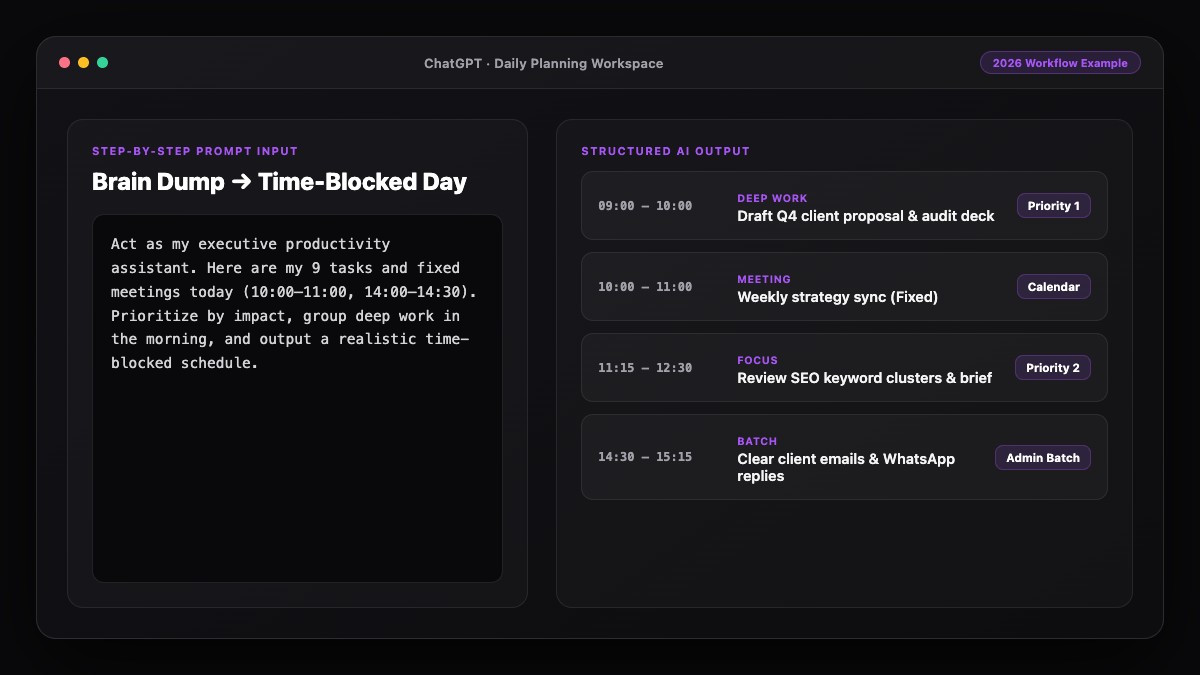
Act as a personal systems organizer. I want a simple, low-maintenance system to organize my life across Tasks, Home, Finances, and Digital Files.

My current pain points: [list 3-4 frustrations, e.g., meal planning, missed renewals, messy Google Drive].
Tools I already use: [e.g., Notion, Google Calendar, Todoist].

Design:
1. A clean 5-folder structure for my digital files with naming conventions.
2. A list of 10 recurring annual/quarterly reminders I should set up today.
3. A simple 15-minute Sunday reset checklist I can follow every week.
2. Rotating Meal Plan & Aisle-Grouped Grocery List
Create a 5-day weeknight dinner plan for [NUMBER] people.
Constraints: Max 25 minutes active cooking, high protein, [dietary preferences/dislikes], and reuse overlapping ingredients to minimize waste.
After the menu, output one consolidated grocery list grouped by store section (Produce, Meat/Protein, Dairy, Pantry, Frozen).
3. Important Document Cheat Sheet
Read this [insurance policy / lease / warranty PDF] and extract a plain-English summary table with:
- Coverage or key terms
- Important dates and renewal/cancellation deadlines
- Costs, deductibles, or penalties
- Phone numbers or URLs for claims/support.
Common Mistakes to Avoid
- Building a complicated Notion template you never open: Complexity kills consistency. Start with three simple lists before adding aesthetic dashboards.
- Uploading sensitive identity numbers to public or unvetted tools: Redact Social Security numbers, bank account numbers, and passwords before pasting financial or legal documents into any AI chat.
- Trying to reorganize 10 years of files in one weekend: Set up your clean five-folder structure for everything moving forward, and put old files in an "Archive" folder to sort only when needed.
- Skipping the weekly reset: Without a 15-minute weekly review, even the smartest AI setup drifts back into clutter within a month.
References & Official Sources
All workflows, pricing tiers, and feature capabilities in this guide were verified against the official platform documentation:
- OpenAI ChatGPT Official Platform (chatgpt.com)
- Anthropic Claude Official Workspace (claude.ai)
- Google Gemini Official Assistant (gemini.google.com)
- Notion AI Official Documentation (www.notion.so)
- Todoist Official Task Manager (todoist.com)
- KwiqRank AI Workflow Integration Guide — Internal methodology for combining AI tools into repeatable business processes.
Final Thoughts
Using AI to organize your life in 2026 is about replacing mental friction with repeatable systems. When your tasks, meals, documents, and calendar live in one simple loop supported by AI, you free up hours of attention for the people and projects you actually care about. To connect your personal habits with your professional tools, explore our personal AI automation system guide or reach out to our team for workflow consulting.
Your questions, answered in plain English
AI can sort messy brain dumps into prioritized to-do lists, plan weekly meals and grocery lists, summarize long insurance or lease PDFs, and design a clean digital folder structure.
A simple, effective stack is ChatGPT or Claude for daily sorting and planning, Notion for storing notes and life dashboards, and Todoist or Google Calendar for recurring reminders.
Always redact sensitive details like Social Security numbers, passwords, and full bank account numbers before uploading documents, and turn off model training in your privacy settings.
You can set up your core folders, Life Inbox, and recurring reminders in about 45 to 60 minutes, then maintain everything with a 15-minute Sunday reset.
AI cannot directly rearrange your local hard drive without automation tools, but it can design a clean 5-folder naming system and write scripts or rules to help you sort files.
Keep your system brutally simple: one inbox for capture, one daily list of three priorities, and one 15-minute Sunday reset. Avoid complex dashboards.
Still curious? Send us your question and a strategist will get back to you.

Want this done for you?
We can put this guide to work on your website. Start with a free audit.
Get my free auditWritten by KwiqRank Team
KwiqRank is a digital marketing agency in Mumbai, India, working with UK and US businesses on SEO, GEO, AEO, paid media and websites. We check facts against official sources, and tell you when something is unconfirmed. Spotted a mistake? Tell us and we will correct it.
Found this useful?
Talk to us about your site
Tell us what you are working on and we will say plainly what we would do first.