
How to Use AI to Write Polite Follow-Up Emails That Get Replies
Stop sending "just checking in" emails. Learn how to write polite, high-reply follow-up emails using AI in under 75 words with copy-paste prompts.

- Read time
- 6 min read
- Sections
- 11
- FAQs answered
- 6
- Topic
- Email & Communication
To write follow-up emails using AI that actually get replies, give the AI the original thread context, state how many days have passed, and ask for a 50-to-75-word message that offers value or an easy "yes/no" out—never "just checking in." AI turns awkward nudges into helpful, high-response messages in seconds.
Following up is where most deals, partnerships, and approvals are won—yet most professionals either avoid it because they do not want to feel annoying, or send generic "Bumping this to the top of your inbox!" emails that get archived without a reply. The problem is rarely the recipient ignoring you on purpose; they are simply busy, and your follow-up gave them no easy reason or low-friction way to respond.
AI helps you write follow-ups that feel thoughtful, respectful of the reader's time, and varied across every touchpoint—without spending 10 minutes second-guessing your phrasing.
What You'll Need
You can draft follow-ups using any standalone AI chat or directly inside Gmail and Outlook.
| Tool | Free Tier | Paid Tier | Follow-Up Advantage |
|---|---|---|---|
| ChatGPT | Free GPT-4o mini and limited flagship access | ChatGPT Plus ($20/mo) with Projects for multi-step sequences | Great for generating a 3-touch follow-up sequence in one prompt |
| Gemini in Gmail | Basic nudge reminders in Gmail | Google Workspace AI add-on / Google One AI Premium ($19.99/mo) | Drafts follow-ups directly inside the original Gmail thread |
| Microsoft Copilot | Free web chat for pasted emails | Copilot Pro ($20/mo) or Microsoft 365 Copilot ($30/user/mo) | Drafts context-aware follow-ups inside Outlook |
Claude is also a top pick for high-stakes sales or executive follow-ups because it avoids pushy, cliché sales language.
Step 1: Choose the Right Timing and Follow-Up Angle
Before prompting AI, match your follow-up angle to how much time has passed:
- Day 2–3 (First nudge): Quick, helpful reminder assuming they are busy.
- Day 7 (Value-add nudge): Share one useful resource, quick idea, or updated option—do not just repeat your first email.
- Day 14+ (Breakup / easy-out nudge): Give them a polite, pressure-free way to say "not now" or "wrong timing."
Step 2: Paste the Original Email and State What Is Missing
Never ask AI to write a follow-up in a vacuum. Paste your original sent email (or summarize it in two lines) and tell the AI what you are waiting on—a signed contract, feedback on a draft, or a 15-minute call booking. If the follow-up is part of a huge chain, first summarize the email thread with AI so you reference the latest decision accurately.
Step 3: Ban "Just Checking In" and Cap Length at 75 Words
Tell your AI explicitly: "Do not use 'just checking in', 'circling back', 'touching base', or 'bumping this up'. Keep the entire email under 75 words."
Short follow-ups respect the reader's time and fit entirely on a mobile lock screen, which dramatically increases reply rates.
Step 4: End With a Zero-Effort Call to Action
People delay replying when replying feels like work. Ask AI to end your follow-up with a binary choice or a one-word reply option—for example: "Should we keep Tuesday at 2 PM on the calendar, or push to next week?" or "Reply with 'Pause' if priorities shifted and I will stop following up for now."
Step 5: Save Your Best 3-Step Sequence for Reuse
Once you find a follow-up style that consistently gets replies from clients or prospects, save it as a reusable 3-email sequence using our guide on how to create email templates using AI. For quicker informal nudges, you can also send a polite check-in using our AI WhatsApp message guide.
Best Prompts to Copy and Paste
Copy these prompts into ChatGPT, Claude, or Gemini to write follow-ups that get answers.
1. Polite First Follow-Up (No Clichés)
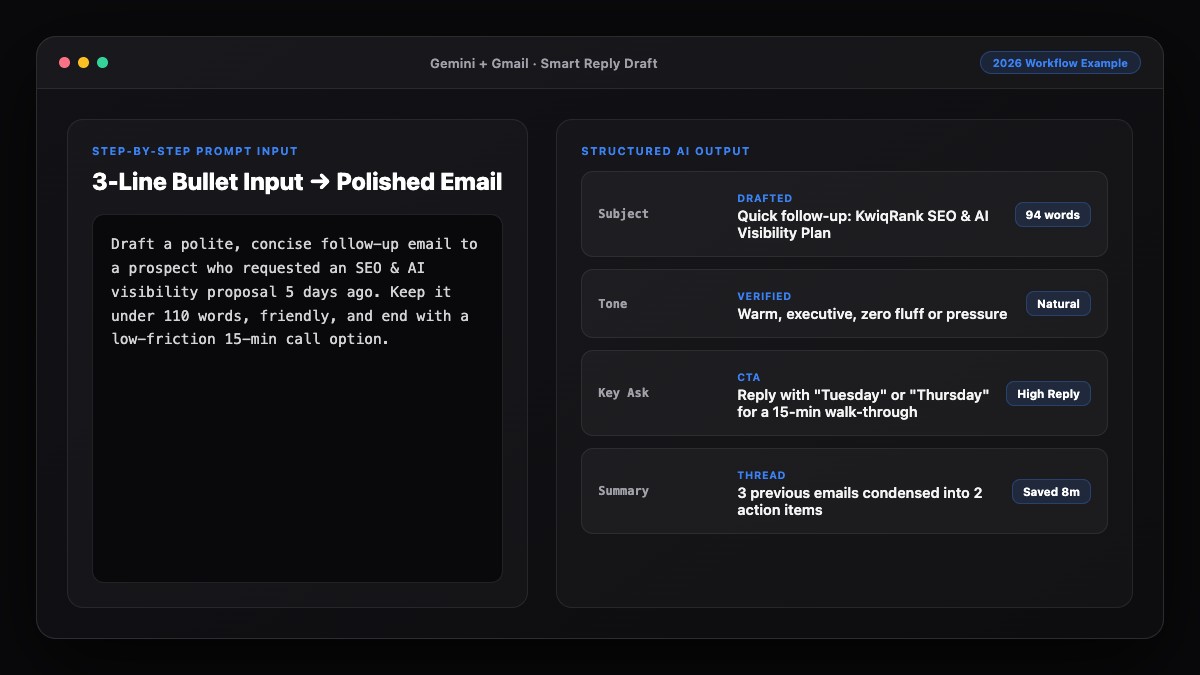
Write a polite, low-pressure follow-up email to the message below.
- Days since last email: [e.g., 4 business days]
- What I need: [e.g., Feedback on the Q3 proposal]
- Rules: Under 65 words. Do NOT use "just checking in", "circling back", or "touching base".
- End with an easy A-or-B question so they can reply in 10 seconds.

Original email:
[Paste original email]
2. Value-Add Follow-Up After Silence
Draft a helpful 2nd follow-up for [Recipient Name] who hasn't replied in [7-10] days.
- Instead of repeating my pitch, lead with this useful insight/update: [Insert 1-sentence insight, link, or quick win]
- Connect it briefly to our earlier email about [Topic].
- Keep it under 75 words, warm, and zero guilt-tripping.
3. The Polite "Easy-Out" Final Follow-Up
Write a respectful final follow-up email (the "close the loop" message) after 2 unanswered emails about [Topic].
- Acknowledge they may have shifted priorities.
- Give them a simple, pressure-free way to reply ("Just let me know if I should close this out for now or revisit next month").
- Under 60 words, friendly and dignified.
Common Mistakes to Avoid
- Passive-aggressive guilt-tripping: Phrases like "As per my previous two emails" or "Still waiting on your response" trigger defensiveness. Keep the tone neutral and helpful.
- Re-pasting your entire first pitch: Follow-ups should be shorter than the original email, not a repeat of a 300-word explanation.
- Following up too fast: Sending a nudge 12 hours later feels pushy unless it is an urgent same-day deadline. Wait 2 to 4 business days for normal requests.
- Forgetting to reply inside the same thread: Always send follow-ups as a reply to the original thread so the recipient has full context without searching their inbox.
References & Official Sources
All workflows, pricing tiers, and feature capabilities in this guide were verified against the official platform documentation:
- Google Gemini Official Assistant (gemini.google.com)
- Google Workspace AI Features (workspace.google.com)
- Microsoft Copilot Official Portal (copilot.microsoft.com)
- OpenAI ChatGPT Official Platform (chatgpt.com)
- Anthropic Claude Official Workspace (claude.ai)
- KwiqRank AI Workflow Integration Guide — Internal methodology for combining AI tools into repeatable business processes.
Final Thoughts
Learning how to write follow-up emails using AI removes the awkwardness from persistence. When your nudges are under 75 words, free of clichés, and end with an easy-to-answer question, people are far more likely to reply—even if the answer is "let's revisit next month."
Want to level up your broader email outreach? Explore our email marketing strategy guide or contact our team for help building AI-assisted follow-up workflows.
Your questions, answered in plain English
Aim for 50 to 75 words. Short follow-ups fit on a mobile screen without scrolling and respect the recipient’s time, leading to higher reply rates.
Explicitly ban "just checking in," "circling back," "touching base," "bumping this to the top of your inbox," and "per my last email."
Wait 2 to 4 business days for a first follow-up, 7 days for a second value-add follow-up, and 14+ days for a polite final "close the loop" message.
Always reply inside the original thread so the recipient can immediately see what you are referencing without searching their inbox.
Yes. Give ChatGPT or Claude your original email and ask for Day 3, Day 7, and Day 14 follow-ups, each with a different angle and under 75 words.
It is a polite final message that gives the recipient permission to say "not now" or "priorities changed," which often prompts honest replies from people who felt guilty about ignoring earlier emails.
Still curious? Send us your question and a strategist will get back to you.

Want this done for you?
We can put this guide to work on your website. Start with a free audit.
Get my free auditWritten by KwiqRank Team
KwiqRank is a digital marketing agency in Mumbai, India, working with UK and US businesses on SEO, GEO, AEO, paid media and websites. We check facts against official sources, and tell you when something is unconfirmed. Spotted a mistake? Tell us and we will correct it.
Found this useful?
Get recommended by AI search
We check whether Google, ChatGPT and Perplexity can reach your pages, then fix what blocks them. No guarantees, just a clear plan.