
How to Ask Better Questions to AI and Get Better Answers
Stop getting generic AI replies. Learn the 4-part CCOF questioning framework, "interview me first" prompts, and follow-up techniques that dramatically improve AI answers.

- Read time
- 7 min read
- Sections
- 11
- FAQs answered
- 6
- Topic
- Research & Learning
To ask better questions to AI and get better answers, replace vague one-line requests with a clear four-part structure: define the role or perspective, state your exact context and constraints, specify the output format and verification standard, and iterate with targeted follow-up questions.
When an AI gives a generic, surface-level, or slightly off-target response, it is rarely because the model lacks capability—it is usually because the question left too many blanks for the model to guess. Vague prompts force AI to aim for the statistical average of what most people might want. Learning how to frame sharp, context-rich questions immediately upgrades every workflow, whether you want to research faster using AI, analyze dense reports, or learn a complex new skill.
What You'll Need
Better questioning works across every major AI assistant on both free and paid tiers. Here is how the four leading tools respond to structured prompting.
| Tool | Free Tier | Paid Tier | How It Rewards Better Questions |
|---|---|---|---|
| Claude | Free daily messages with document uploads | Claude Pro ($20/mo) with Projects, extended thinking, and higher limits | Follows multi-part constraints, tone rules, and step-by-step reasoning tightly |
| ChatGPT | Free GPT-4o mini / limited GPT-4o, web search, and file uploads | ChatGPT Plus ($20/mo) with custom instructions, Projects, and higher caps | Excels at structured outputs, roleplay, and clarifying follow-ups |
| Perplexity AI | Unlimited quick searches, limited Pro searches with live citations | Perplexity Pro ($20/mo) with Deep Research and Focus controls | Rewards date ranges, domain filters, and source-type constraints with cleaner citations |
| Google Gemini | Free access to Gemini models and Google ecosystem integration | Google One AI Premium with Gemini Advanced and Workspace integration | Strong at synthesizing multi-step prompts across Docs, Drive, and general research |
Step 1: Define the Goal and Audience Before Typing
Before you write a prompt, answer one question in your head: What decision or artifact will this answer power? An explanation of "vector databases" for a software architect looks completely different from one for a product manager or a first-year student.
Stating who the answer is for—and what level of technical depth you want—prevents the AI from either talking down to you with clichés or burying you in unexplained jargon. If you are studying a new subject, check out our guide on how to learn any new skill faster using AI to see how audience framing shapes coaching prompts.
Step 2: Use the 4-Part CCOF Question Framework
Whenever an answer actually matters, structure your question using four lightweight building blocks (CCOF):
- Context: Who you are, what you already know, and what situation you are dealing with.
- Constraint: Boundaries on length, date range, geography, budget, or excluded sources.
- Output Format: Whether you want a 3-bullet brief, a comparison table, a step-by-step checklist, or a critique.
- Fact / Uncertainty Rule: Tell the model what to do when it is unsure—for example, "If a figure is not in the provided text or verified sources, state 'Unknown' instead of guessing."
Notice how this single habit cuts hallucinations and fluff in half. When working with live search tools, you can see this framework in action in our Perplexity AI research guide.
Step 3: Ask for Examples, Trade-Offs, and Counterarguments
Single-sided questions produce single-sided answers. If you ask, "Why is X a good strategy?", AI will happily give you five persuasive reasons and hide the downsides. Instead, ask balanced, decision-oriented questions:
- "Give me the 3 strongest reasons to use Approach A, the 3 situations where it fails, and when Approach B wins."
- "Provide one concrete example from a B2B SaaS team with under 50 employees, not a Fortune 500 case study."
- "What assumptions would have to be true for this recommendation to work?"
Asking for failure modes and boundary conditions forces the model out of generic cheerleading and into useful analysis.
Step 4: Let the AI Interview You First on Complex Tasks
You do not always know every detail the AI needs upfront—especially when planning a project, designing a study schedule, or diagnosing a tricky problem. Flip the dynamic: describe your rough goal and add one sentence at the end: "Before answering, ask me up to 5 clarifying questions that would make your response dramatically more accurate."
Answering those five short questions takes 30 seconds and eliminates three rounds of generic back-and-forth. This technique works wonderfully when you create a personalized study plan using AI or draft a strategic brief.
Step 5: Chain Focused Follow-Ups Instead of Mega-Prompts
Beginners often cram six unrelated tasks into one 400-word prompt, which causes the model to rush or skip instructions in the middle. Instead, treat an AI session like a conversation with a smart colleague:
- Pass 1 (Map): Ask for the core framework, options, or outline.
- Pass 2 (Critique): Ask what is missing, risky, or overly generic in Pass 1.
- Pass 3 (Refine): Lock in the exact format, tone, or next steps you want.
When analyzing long readings, chaining focused questions—like mapping headings before summarizing—keeps every detail sharp. See our guide on how to summarize long PDFs using AI without missing key details for a complete multi-pass example.
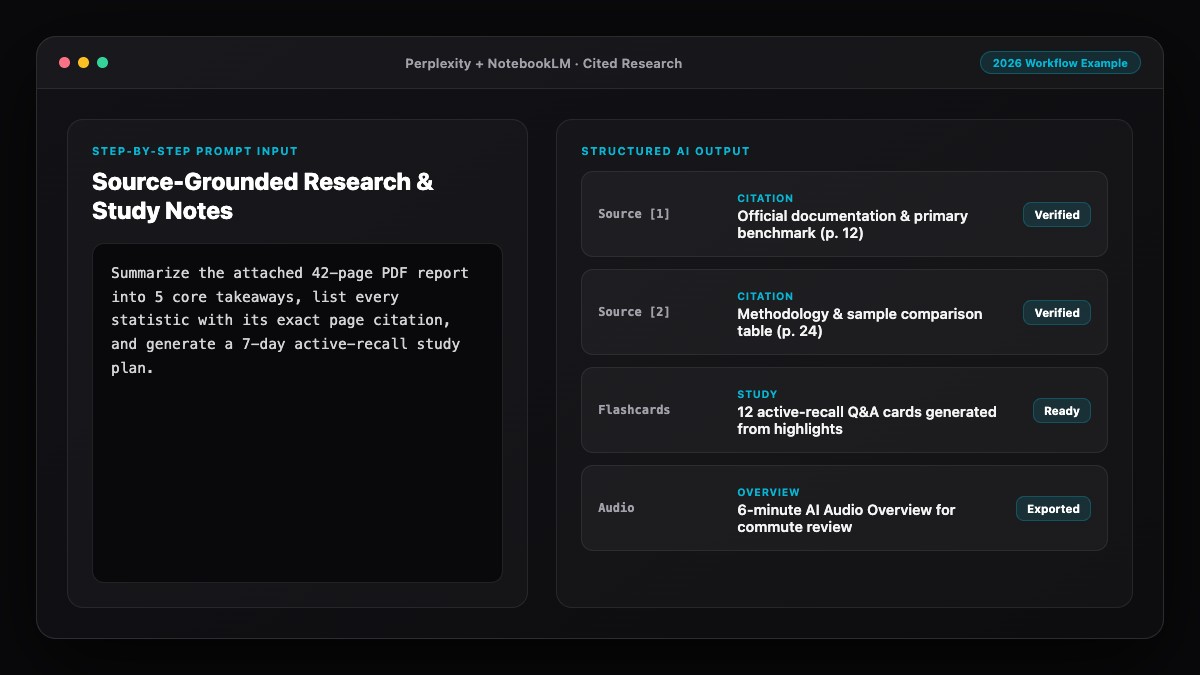
Best Prompts to Copy and Paste
Save these three meta-prompts to turn any vague idea into a sharp, high-signal AI answer.
1. The CCOF High-Precision Question Template:
Context: I am [YOUR ROLE/SITUATION] trying to [GOAL]. I already know [BASELINE].
Question: [YOUR SPECIFIC QUESTION]
Constraints: Focus on [TIMEFRAME/REGION/SCOPE]. Avoid generic filler and do not guess if data is missing.
Output Format: Give me a 3-sentence direct answer first, followed by a comparison table of options and 2 key caveats.
2. The "Interview Me First" Prompt:
I want help with [PROJECT OR PROBLEM].
Before you give me a final answer or plan, ask me 5 targeted clarifying questions about my constraints, goals, and preferences. Once I reply, deliver a tailored recommendation.
3. The Steelman & Failure-Mode Follow-Up Prompt:
Review your answer above as a skeptical domain expert.
1. What are the 3 biggest assumptions or blind spots in this recommendation?
2. Under what specific conditions would this advice fail?
3. What would you change to make the answer more concrete and verifiable?
Common Mistakes to Avoid
- Asking leading questions: Prompts like "Explain why X is better than Y" bias the model to confirm your hunch instead of weighing evidence fairly.
- Omitting negative constraints: Telling AI what to exclude ("no generic intro," "exclude tools over $50/mo," "skip basic definitions") is often as powerful as telling it what to include.
- Accepting the first draft as final: Treat the first response as a starting point. One follow-up asking for tighter examples or edge cases usually doubles output quality.
- Never giving a "say I don't know" escape hatch: Without permission to say "Unknown" or "Not in the sources," models are trained to sound helpful—even when guessing.
- Starting a new chat for every tiny tweak: Stay in the same thread for related follow-ups, but start a fresh thread when switching to an unrelated topic so old context does not pollute new answers.
References & Official Sources
All workflows, pricing tiers, and feature capabilities in this guide were verified against the official platform documentation:
- Perplexity AI Official Search Engine (www.perplexity.ai)
- Google NotebookLM Official App (notebooklm.google.com)
- OpenAI ChatGPT Official Platform (chatgpt.com)
- Anthropic Claude Official Workspace (claude.ai)
- Google Gemini Official Assistant (gemini.google.com)
- KwiqRank AI Workflow Integration Guide — Internal methodology for combining AI tools into repeatable business processes.
Final Thoughts
Learning how to ask better questions to AI and get better answers is the highest-leverage skill in modern research and learning—because it improves every tool you touch. Use the CCOF framework, ask for trade-offs and failure modes, let the AI interview you on complex problems, and iterate in focused passes. If you also publish content and want to understand how question-style queries shape what AI search engines surface and cite, read our Answer Engine Optimization guide.
Your questions, answered in plain English
Short, open-ended questions leave out your audience, constraints, and goal, forcing the model to produce a safe, average answer designed for everyone and tailored to no one.
No. Plain, specific English works best—just state who you are, what constraints matter, what format you want, and what the model should do if information is uncertain.
Add "Before answering, ask me 5 clarifying questions about my goal and constraints" to the end of your prompt on any complex task.
Avoid leading questions and explicitly ask for counterarguments, failure modes, and a skeptical expert review of your premise.
Continue in the same thread for follow-up refinements on one topic, but open a fresh chat as soon as you switch subjects or when an earlier mistake is anchoring the conversation.
Yes. Giving explicit scope, date limits, and an instruction to say "Unknown" when evidence is missing significantly cuts down on confident guessing—especially when paired with citation-first search or uploaded files.
Still curious? Send us your question and a strategist will get back to you.

Want this done for you?
We can put this guide to work on your website. Start with a free audit.
Get my free auditWritten by KwiqRank Team
KwiqRank is a digital marketing agency in Mumbai, India, working with UK and US businesses on SEO, GEO, AEO, paid media and websites. We check facts against official sources, and tell you when something is unconfirmed. Spotted a mistake? Tell us and we will correct it.
Found this useful?
Get recommended by AI search
We check whether Google, ChatGPT and Perplexity can reach your pages, then fix what blocks them. No guarantees, just a clear plan.