
How to Use Perplexity AI for Research: Complete Beginner Guide
Learn how to use Perplexity AI for research step by step—from choosing Focus modes and Pro Search to auditing citations, running follow-up Threads, and organizing Spaces.

- Read time
- 7 min read
- Sections
- 11
- FAQs answered
- 6
- Topic
- Research & Learning
To use Perplexity AI for research effectively, frame a specific question, choose the right Focus mode (Web, Academic, or Social), inspect the numbered source list before trusting the summary, and use follow-up Threads to drill into primary data and opposing viewpoints.
Standard search engines hand you ten blue links and leave you to click through ads, cookie banners, and bloated SEO intros. Traditional chatbots give you a clean paragraph, but often hide where the answer came from—or guess when their training data runs out. Perplexity AI bridges both worlds by running live searches across the web and returning structured answers with numbered citations you can verify in one click. Once you master its interface, you can research any topic faster using AI without sacrificing source quality.
What You'll Need
Perplexity works immediately in any browser without even creating an account, though signing in unlocks saved Threads, Spaces, and file uploads. Here is how its free and paid plans compare alongside companion research tools.
| Tool | Free Tier | Paid Tier | Best Use Case |
|---|---|---|---|
| Perplexity AI | Unlimited quick searches, limited Pro searches, Web/Academic Focus, Thread history | Perplexity Pro ($20/mo) with expanded Pro searches, Deep Research, file analysis, and model switching | Live source-backed research, fact-checking, and current market/academic synthesis |
| Google NotebookLM | Free notebooks with up to 50 sources, citation-pinned answers, Audio Overviews | NotebookLM Plus (via Google One AI Premium / Workspace) with higher limits | Deep study of PDFs and docs you found via Perplexity |
| ChatGPT | Free tier with web search and basic file uploads | ChatGPT Plus ($20/mo) with Deep Research, Projects, and higher usage caps | Drafting reports and brainstorming frameworks from gathered facts |
| Claude | Free daily messages with document upload support | Claude Pro ($20/mo) with Projects and extended reasoning | Editing long-form research memos and critiquing arguments |
Step 1: Choose the Right Search Mode and Focus
Before typing your prompt, look at the controls inside the Perplexity search bar. Choosing the right mode upfront changes which sources Perplexity retrieves and how deeply it reads them.
- Quick Search: Best for fast definitions, factual lookups, and straightforward comparisons where one search pass is enough.
- Pro Search: Breaks complex questions into multi-step sub-queries, reads more pages, and sometimes asks clarifying questions before answering. Use this for serious research.
- Deep Research: Runs an extended multi-minute investigation across dozens of sources and outputs a structured, multi-section report.
Next, set your Source Focus. Use Web for general industry, policy, or product research; switch to Academic when you want peer-reviewed papers and preprints; or toggle Social to gauge real user sentiment and practitioner discussions on forums.
Step 2: Write a Research-Grade Query
Treat Perplexity like a research analyst, not a keyword box. Instead of typing AI healthcare adoption stats, include the exact scope, timeframe, and source standard you want:
"What are the adoption rates and measured clinical time savings of generative AI documentation tools in U.S. hospitals from 2024 to 2026? Prioritize peer-reviewed studies, AMA surveys, and health system reports, and list sample sizes."
Specifying date ranges and preferred publisher types steers Perplexity away from generic marketing blogs. For more frameworks on structuring clear prompts, read our guide on how to ask better questions to AI.
Step 3: Audit the Citations Before Reading the Prose
When Perplexity finishes generating an answer, resist the urge to copy the text right away. Start at the Sources strip at the top or the numbered citation chips [1], [2], [3] inline.
- Check domain authority: Are the citations pointing to universities, government agencies, and primary reports—or recycled SEO listicles?
- Click through to verify: Open the key links in a new tab and confirm the cited number or quote actually appears in that context.
- Remove weak sources: On Pro/thread views, you can inspect and exclude low-quality domains or ask Perplexity to re-run the answer using only primary institutional sources.
If you find dense PDFs through those citations, download them and use our workflow to summarize long PDFs using AI without missing key details.
Step 4: Use Follow-Up Threads to Go Deeper
Perplexity's real strength is conversational narrowing. Every search opens a Thread that remembers the context and sources of your previous query. Use follow-up prompts to interrogate the first answer:
- "Which of those cited studies had a sample size larger than 500 participants?"
- "What are the strongest counterarguments or risks raised by critics of this finding?"
- "Summarize the methodology differences between Source [2] and Source [4] in a comparison table."
Keeping follow-ups inside the same Thread lets you peel back layers of nuance without starting from zero.
Step 5: Organize Findings in Spaces and Export Clean Notes
If you are researching a multi-day project—such as a market entry brief, thesis chapter, or competitive audit—group related Threads inside a Perplexity Space. Spaces let you set custom instructions (for example, "Always format statistics with year and sample size, and flag any source older than 2024") and upload your own reference PDFs alongside live web search.
When your Thread is complete, export or copy the verified summary into your note-taking app, or move your collected PDFs into Google NotebookLM for dedicated study. You can also follow our document-to-notes guide to turn raw research threads into clean, scannable study sheets.
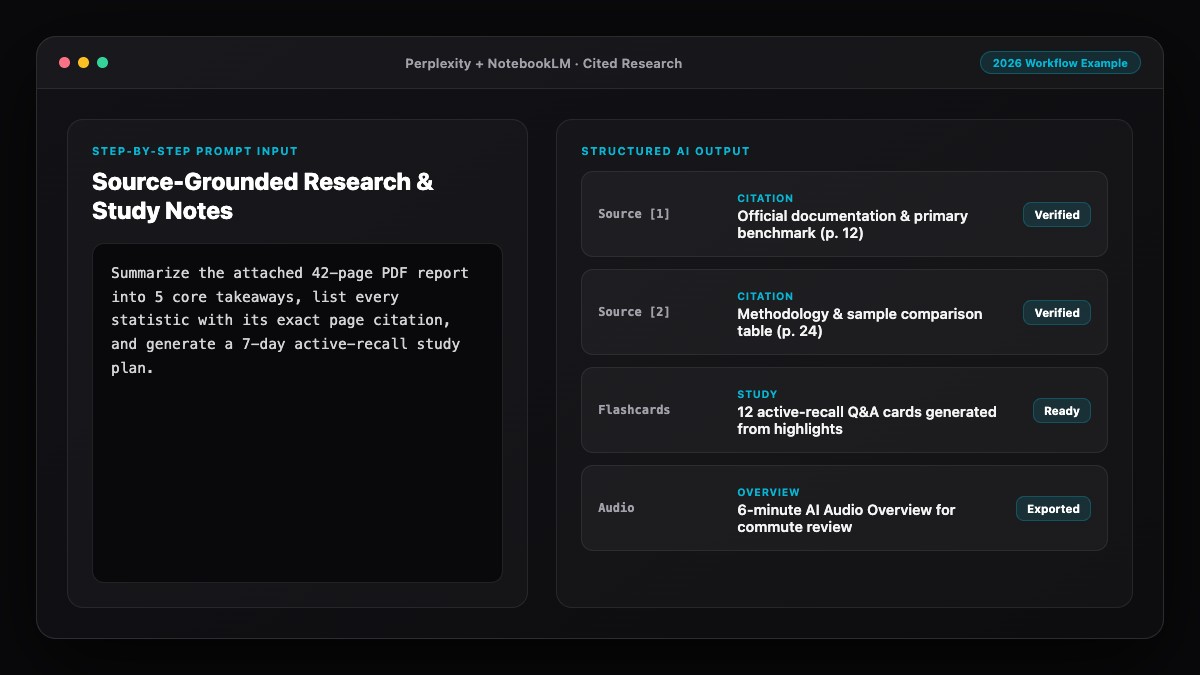
Best Prompts to Copy and Paste
Copy these templates into Perplexity AI to get cleaner, better-sourced research outputs from your very first query.
1. Primary-Source Discovery Prompt:
Investigate [TOPIC] using primary sources published from [YEAR] onward (government datasets, peer-reviewed papers, regulatory filings, or official company documentation).
Provide:
- Direct answer in 3 sentences
- Key data points with source organization, year, and sample size
- Links to the original reports where the data was first published.
Ignore undated blog posts and affiliate roundups.
2. Side-by-Side Comparison Prompt:
Compare [OPTION A] vs. [OPTION B] for [SPECIFIC USE CASE] based on documented benchmarks, official pricing, and independent reviews from [YEAR].
Present the findings in a markdown table covering:
- Core strengths
- Documented limitations
- Total cost / tier limits
- Best-fit scenario.
Cite a specific source for every row.
3. Counter-Evidence & Bias Check Follow-Up:
Review the findings above. What are the top 3 methodological limitations, conflicting studies, or criticisms from domain experts regarding [CLAIM]? Cite independent sources that challenge or qualify this conclusion.Common Mistakes to Avoid
- Using Quick Search for complex multi-part questions: Quick Search optimizes for speed, not depth. Switch to Pro Search or Deep Research whenever a decision depends on nuance.
- Never clicking the citation links: Perplexity summarizes accurately most of the time, but it can still misinterpret a chart or quote a secondary blog that misread a study.
- Searching without a date filter on fast-moving topics: In AI, tax law, healthcare, or software pricing, a 2022 article is often wrong today. Always state the year window in your prompt.
- Uploading sensitive private data without checking settings: Review your privacy settings and disable data retention/training options before uploading proprietary company documents.
- Treating Perplexity as a replacement for reading full papers: Use Perplexity to find and triage the best papers, then read the actual methodology and discussion sections of the top sources.
References & Official Sources
All workflows, pricing tiers, and feature capabilities in this guide were verified against the official platform documentation:
- Perplexity AI Official Search Engine (www.perplexity.ai)
- Google NotebookLM Official App (notebooklm.google.com)
- OpenAI ChatGPT Official Platform (chatgpt.com)
- Anthropic Claude Official Workspace (claude.ai)
- Google Gemini Official Assistant (gemini.google.com)
- KwiqRank AI Workflow Integration Guide — Internal methodology for combining AI tools into repeatable business processes.
Final Thoughts
Once you understand how to use Perplexity AI for research—choosing the right Focus mode, auditing citations first, and probing deeper with Threads—you will never go back to sifting through twenty ad-heavy search tabs. Pair Perplexity with a dedicated document workspace like NotebookLM for long PDFs, and always verify primary links before publishing. If you also run a website or brand and want to understand how Perplexity selects and ranks the sources it cites, read our in-depth Perplexity SEO guide.
Your questions, answered in plain English
Yes. The free tier gives you unlimited quick searches, basic Focus modes, and a daily allowance of Pro searches, which is enough for most everyday research tasks.
Perplexity is built first as a live answer engine that attaches numbered web or academic citations to every claim, whereas ChatGPT is a general-purpose assistant that excels at drafting, coding, and reasoning.
Yes. Switching Focus to Academic prioritizes scholarly papers and preprints, and you can also upload PDFs directly into a Thread or Space for analysis.
It hallucinates far less than ungrounded chatbots, but it can still misread a nuanced table or cite a secondary article that misunderstood a primary study. Always click through to verify critical claims.
Spaces are organized project folders where you can group related research Threads, upload custom reference documents, and apply persistent instructions across every query in that project.
Use Pro Search for targeted questions you want answered in 10 to 20 seconds. Use Deep Research when you want an exhaustive, multi-page briefing compiled from dozens of sources over a few minutes.
Still curious? Send us your question and a strategist will get back to you.

Want this done for you?
We can put this guide to work on your website. Start with a free audit.
Get my free auditWritten by KwiqRank Team
KwiqRank is a digital marketing agency in Mumbai, India, working with UK and US businesses on SEO, GEO, AEO, paid media and websites. We check facts against official sources, and tell you when something is unconfirmed. Spotted a mistake? Tell us and we will correct it.
Found this useful?
Get recommended by AI search
We check whether Google, ChatGPT and Perplexity can reach your pages, then fix what blocks them. No guarantees, just a clear plan.